How a Google SEO Checker Works and Where It Falls Short
See how a google seo checker like Search Console and PageSpeed Insights works, what it misses, and when to add other tools for full SEO visibility.
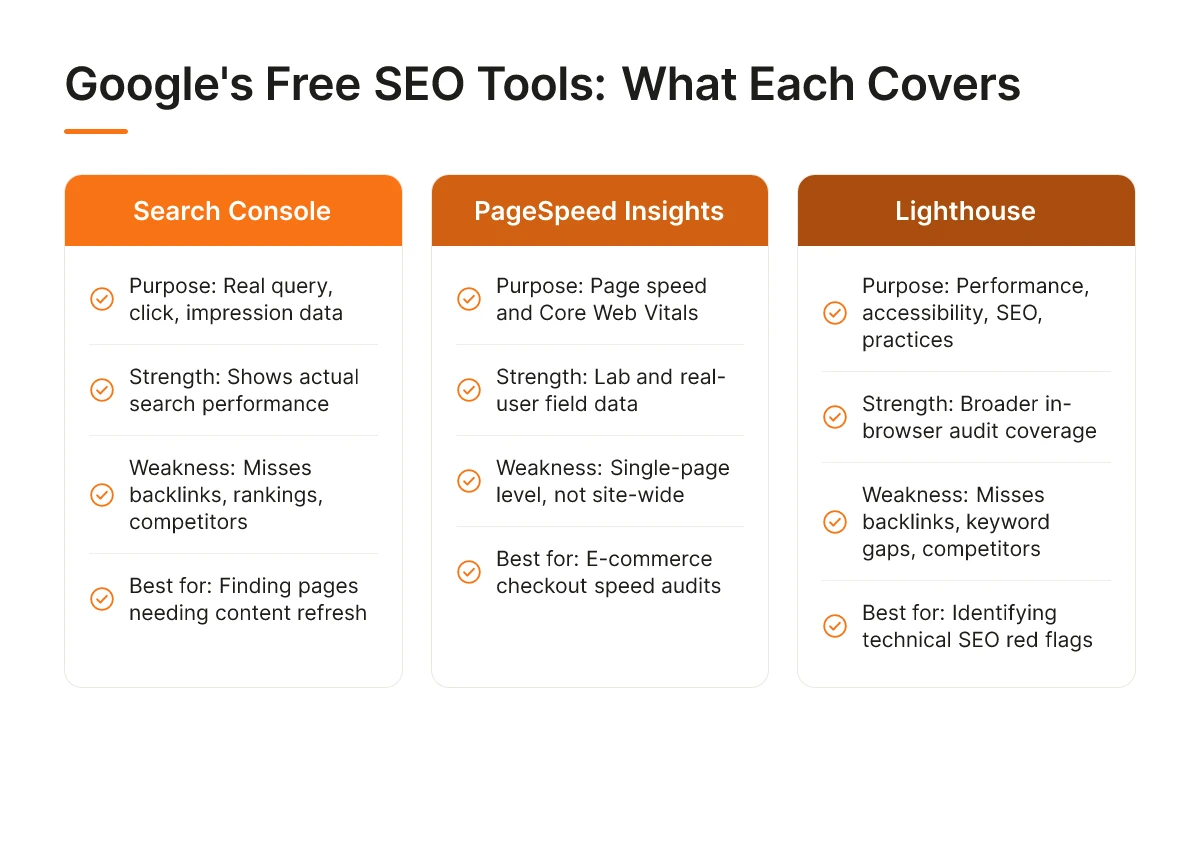
Understanding google seo checker is essential. Google offers three free tools that double as SEO checkers: Search Console (tracks how your site actually performs in search results), PageSpeed Insights (scores page speed and Core Web Vitals), and Lighthouse (audits performance, accessibility, and SEO basics inside Chrome DevTools). Together they show you what Google sees on your site, but none of them check off-page signals like backlinks, competitor rankings, or how AI search engines like ChatGPT and Perplexity describe your business, for that you need to look beyond Google's own toolset.
What Free SEO Checker Tools Does Google Offer?
Google runs three free tools that function as a google seo checker, and each one measures something different, mixing them up is the most common mistake SMB owners make.
Search Console is the only tool of the three that shows real query, click, and impression data pulled from actual Google search results [1]. Log in and you can see which search terms bring visitors to your site, how often your pages appear in results, and what your average position looks like for each query. Nothing else on this list gives you that, PageSpeed Insights and Lighthouse never touch ranking or click data because they're not built to.
PageSpeed Insights is a page-level speed report. It combines lab data (a simulated test run at the moment you check the page) with field data collected from real Chrome users who've visited that page [2]. The output centers on Core Web Vitals, loading speed, interactivity, and visual stability, scored on a 0-100 scale for both mobile and desktop.
Lighthouse goes wider. It's an in-browser audit tool built into Chrome DevTools that checks performance, accessibility, best practices, and a basic SEO tab, things like whether your pages have meta descriptions, legible font sizes, and crawlable links. It's not just a speed test; think of it as a technical health check that happens to include an SEO section, not an SEO tool that happens to check speed. Used together, these three form the closest thing Google offers to a complete google seo checker suite.
Is There a Difference Between Search Console, PageSpeed Insights, and Lighthouse?
Yes, they measure different things and none of them substitute for the others. Search Console shows what happened in search (queries, clicks, impressions). PageSpeed Insights shows how fast one page loads for real visitors. Lighthouse audits a page's overall technical quality inside your own browser. None of the three check backlinks, track keyword rankings against competitors, or tell you how your site stacks up in your niche, that requires a separate category of tool entirely.
Can ChatGPT or Other AI Tools Replace Google's Official SEO Checkers?
No. AI chat tools can explain what a Core Web Vital is or suggest ways to improve page speed, but they can't crawl your live site or pull the real click and impression data that Search Console reports directly from Google's index. That gap matters more now that AI search engines like ChatGPT and Perplexity are becoming a real traffic source themselves, a business that only optimizes for Google's toolset can still be invisible to the systems these AI engines rely on. Moonrank was built for that specific gap, running daily technical audits and content publishing aimed at both Google's ranking signals and the citation patterns AI engines look for.
How to Use Google Search Console and Lighthouse to Audit Your Site
Google Search Console and Lighthouse together work as a free google seo checker, one shows how you perform in search, the other shows why. Both live inside Google's own tools, and reading them correctly is the difference between guessing and fixing the right problem.
What Do Google Search Console Metrics Actually Tell You?
The Performance report shows the queries bringing people to your site, your average position for each one, and your click-through rate (CTR), and the relationship between position and CTR tells you where your listing itself is underperforming. If a query sits at position 4 or 5 but CTR is under 2%, the ranking isn't the problem, your title tag and meta description are. Google often rewrites these anyway when it thinks it can do better [1], so an unclear or generic title is worth rewriting yourself before you touch anything else.
The Coverage (also called Indexing) report matters just as much, especially for e-commerce catalogs and SaaS documentation pages that multiply fast. Pages marked "crawled, currently not indexed" usually mean Google looked at the page and decided it wasn't worth including, often thin content, duplicate product variants, or pages with little unique value. Pages marked "excluded" can mean a blocked robots.txt rule, a canonical tag pointing elsewhere, or a noindex tag left over from staging. For a Shopify store, this report is often where you discover that half your filtered collection pages are quietly excluded from search entirely.
How Do You Interpret Lighthouse Scores and Fix Flagged Issues?
Lighthouse, built into Chrome DevTools and available standalone through PageSpeed Insights [2], scores your page from 0 to 100 across performance, accessibility, best practices, and SEO, using a red, orange, and green color system. Treat red (0-49) as broken and fix it first; orange (50-89) as worth scheduling; green (90-100) as done. Chasing a yellow score to green while ignoring a red one is a common mistake, the red flag is usually the one actually hurting rankings or conversions.
A typical fix path looks like this: Lighthouse flags "eliminate render-blocking resources," which means CSS or JavaScript files are loading before the page can display anything, the practical fix is deferring non-critical scripts or inlining critical CSS. If it flags missing alt text, that means screen readers and Google's crawlers can't tell what your product images show, write short, literal descriptions like "red ceramic coffee mug" instead of leaving the field blank or stuffing it with keywords.
Moonrank uses these same signals, page speed, structured data, indexing gaps, as inputs for its technical AI audit, then fixes schema markup and llms.txt configuration automatically so AI search engines like ChatGPT and Perplexity can parse your site as reliably as Google does.
What SEO Issues Do Google's Official Tools Miss?
A clean report from Search Console or PageSpeed Insights tells you almost nothing about backlink quality, competitor keyword gaps, or whether AI engines will ever mention your business.
Google's own toolset was built to answer one question: can Google crawl, render, and index your pages? That's valuable, but it's a narrow slice of what actually determines visibility today, in Google's results and in AI answers alike.
What Common SEO Problems Won't Show Up in Google's Free Tools?
Run any google seo checker from Google itself and you'll get crawl errors, Core Web Vitals scores, and indexing status. You won't get any of the following:
- Backlink profile quality, Search Console shows which sites link to you, but not whether those links are spammy, irrelevant, or actively hurting your domain trust.
- Keyword gap analysis, there's no built-in way to see which terms your competitors rank for that you don't.
- Duplicate content across domains, Google's tools flag some on-site duplication but won't tell you if a scraper or syndication partner is publishing your content elsewhere and diluting your authority.
- Content depth and quality scoring, Lighthouse checks page speed and accessibility, not whether your product page actually answers the questions a buyer is asking.
None of these gaps show up as errors. They show up as silence, no ranking movement, no AI citations, no obvious reason why. This is exactly why relying on a single google seo checker for your entire strategy leaves blind spots you won't notice until traffic stalls.
Why Do Some Sites Rank Well in Google but Get Ignored by AI Search Engines?
The mechanism isn't ranking position, it's entity clarity. AI engines like ChatGPT, Gemini, Claude, and Perplexity need structured signals that state plainly what a business does, who it serves, and why it's credible, and traditional ranking factors don't guarantee any of that exists.
A page can pass every Lighthouse audit and sit on page one of Google while still reading as a wall of unstructured text to a model deciding what to cite. Thin content, a product description with no specifics, no schema, no clear entity definition, can score perfectly on technical checks and still get skipped entirely when an AI engine assembles an answer.
Consider a local restaurant with fast load times, zero crawl errors, and a solid Search Console history. If the site has no schema markup identifying it as a restaurant, no cuisine type, no location data, no structured hours, AI engines have nothing to extract and simply route around it, recommending a competitor with clearer structured data instead. This is the exact gap Moonrank was built to close: it layers schema markup, llms.txt configuration, and citation building on top of a site that already passes Google's checks, so AI engines have something concrete to trust and cite.
Choosing the Right Google SEO Checker for Your Business Type
The right google seo checker setup depends on what you sell and how customers find you, an online store, a blog, and a local shop each need a different combination of Search Console reports.
What's the Best SEO Checker for E-Commerce, Blogs, and Local Businesses?
E-commerce sites should prioritize Search Console's page indexing report alongside PageSpeed Insights. Product pages that fail to get indexed generate zero organic traffic no matter how good the copy is, and slow-loading category or checkout pages hurt both rankings and conversions [2]. If a store owner only checks one metric weekly, it should be indexing status on new product pages, since that's where inventory turnover creates constant churn.
Blog and content-driven sites get more value from Search Console's query data. The performance report shows exactly which pages rank on page two of Google, positions 11 through 20, and those pages are usually one content refresh away from page one. Sorting by impressions with low click-through rate surfaces the fastest wins.
Local businesses need a third layer: Google Business Profile insights. Search Console tracks organic web rankings, but map-pack placement, the three local results shown above organic listings, runs on a separate set of signals including review volume, proximity, and category accuracy. A restaurant or clinic can have a technically flawless website and still lose the map pack to a competitor with more recent reviews, which is why Business Profile data has to sit next to Search Console rather than replace it.
When Should SMBs Add Paid SEO Tools to Google's Free Checkers?
Free tools stop being enough once a business is managing more than one site, watching competitor movement, or trying to track visibility inside AI search engines like ChatGPT or Perplexity, none of which Search Console or PageSpeed report on. That's the qualitative tipping point: not a size threshold, but a complexity threshold.
At that stage, businesses typically look at three tiers. Budget-friendly tools add keyword tracking and basic competitor snapshots. Mid-range platforms add backlink analysis and content planning on top of that. Enterprise tools add multi-site management and deeper reporting for agencies. Moonrank fits a specific gap in that stack: instead of adding another dashboard to check manually, it runs daily content publishing, technical optimization like schema markup and llms.txt, and AI search visibility tracking on autopilot, built for businesses that want the depth without the extra hours.
Turning SEO Checker Results Into Ranking and AI Visibility Gains
A checker report only creates value once you fix issues in the right order: crawl errors first, page speed second, content gaps third, structured data last.
What Does a Real Website SEO Audit Look Like?
A real audit starts in Search Console, not in a generic report. Pull your top queries and pages, then check which ones have impressions but low click-through, that gap usually points to a title tag or meta description problem, not a technical one. Cross-reference those pages against their PageSpeed Insights or Lighthouse scores to see if slow load times are suppressing rankings too [2].
From there, resist the urge to fix everything a google seo checker flags in one sitting. Most reports return 20 or more issues, but only a handful actually move rankings. Identify the three to five highest-impact fixes, usually a mix of one crawl issue, one speed issue, and one or two content gaps, and work through those before touching anything cosmetic.
How Do You Prioritize Which Issues to Fix First?
Fix indexing and crawl errors before anything else, because a page Google can't crawl or index can't rank no matter how good the content is. Google's own documentation frames this as the foundation of getting a site discoverable at all [1]. Next, address Core Web Vitals and page speed using Lighthouse or PageSpeed Insights data, since slow pages lose both rankings and users [2]. Only after those two layers are solid should you turn to on-page content gaps, thin pages, missing headers, weak internal linking, and finally structured data markup, which helps search engines and AI systems parse what a page is actually about.
This order matters because fixing structured data on a page Google can't even crawl wastes effort. Sequence the work, and each fix compounds on the one before it.
Here's the limit of this whole exercise: passing every check in a google seo checker gets you a healthy, crawlable, fast website, it does not get ChatGPT, Gemini, or Perplexity to mention your business. Those systems aren't reading Lighthouse scores. They're pulling from structured, citable content that clearly states who you are, what you sell, and why you're credible in your category, something Google's technical tools were never built to produce or track.
That's the layer Moonrank operates on. It runs the technical fixes checkers can't automate, schema markup, llms.txt configuration, citation building, while publishing optimized content daily and tracking how your business actually gets represented across ChatGPT, Gemini, Claude, and Perplexity. Instead of running audits manually every few weeks, you get an autopilot system doing both the Google-side technical work and the AI-visibility tracking in one place. Start at www.moonrank.ai to see where your business currently stands.

Frequently Asked Questions
Is Google Search Console enough for SEO, or do I need other tools?
Search Console covers indexing, click data, and technical errors, but it won't audit page speed, content quality, or competitor gaps on its own. Most store owners pair it with PageSpeed Insights [2] for performance and a separate tool for keyword research and content planning. Think of Search Console as your diagnostics panel, not your full toolkit.
How often should I run a Lighthouse audit on my website?
Run Lighthouse monthly, or immediately after any major site change like a theme update or new checkout flow. E-commerce sites that add products or apps weekly should check quarterly at minimum, since new scripts and images often slow page load without anyone noticing.
Does a good PageSpeed Insights score guarantee better rankings?
No, a high score helps but doesn't guarantee rankings on its own. Page experience is one of many ranking factors Google weighs alongside content relevance and backlinks [1]. A fast site with thin, generic content still loses to a slower page that actually answers the searcher's question.
Can I check my SEO for free without any third-party tools?
Yes, Google Search Console and PageSpeed Insights are both free and cover indexing status, mobile usability, and page speed [1][2]. These give you the technical basics of any google seo checker workflow, though you'll still need a way to track keyword rankings and content gaps over time.
Why does my site rank on Google but never get mentioned by ChatGPT?
Google's crawlers and AI models like ChatGPT read your site differently, one ranks pages, the other retrieves and synthesizes answers from structured, trustworthy content. If your site lacks schema markup, clear entity signals, or an llms.txt file, AI engines may struggle to parse and cite you even when Google indexes you fine. This is the gap tools built for traditional SEO checkers don't address.
Conclusion
Google's free tools, Search Console and PageSpeed Insights, remain the right starting point for technical health checks, but they were built for an era when Google was the only search engine that mattered [1][2]. Ranking well there no longer guarantees a mention when a customer asks ChatGPT or Perplexity for a recommendation. Treat any google seo checker as your baseline, not your whole strategy: fix crawl errors and page speed first, then address the schema markup and structured data AI engines actually rely on. If you want that second layer handled automatically instead of manually, see how Moonrank tracks and builds AI search visibility at moonrank.ai.
Sources & References
- Google Search Central (formerly Webmasters) | Web SEO Resources | Google for Developers
- PageSpeed Insights
Recommended Articles
Explore more from our content library: