Which SEO tools are worth it for small businesses?
The SEO tools worth paying for are the ones that save a small business owner time on keyword research, rank tracking, and content optimization without.....

Understanding Which SEO tools are worth it for small businesses? is essential. The SEO tools worth paying for are the ones that save a small business owner time on keyword research, rank tracking, and content optimization without requiring technical skill or an agency retainer. For most small businesses, that means starting with free tools like Google Search Console and Google Analytics to establish a baseline, then adding one or two budget-friendly paid tools once you need deeper keyword data, automated rank tracking, or content guidance at scale. The right mix depends on your platform (Shopify, WordPress), your team's technical comfort, and whether you need all-in-one coverage or a single specialized tool.
Is SEO Worth It for a Small Business, and What's the Realistic ROI?
SEO is worth it for most small businesses because the traffic it builds keeps compounding long after you stop paying for the work, unlike ads that stop the moment you stop paying. This is particularly relevant for Which SEO tools are worth it for small businesses?.
That compounding mechanism is the whole case for SEO over channels like paid search. A blog post optimized for a keyword your customers actually search keeps ranking and pulling in visitors for months or years, with only occasional updates. A paid ad campaign stops delivering the second you pause the budget. This means SEO has a longer payoff window than paid acquisition, but the cost curve flattens over time, the fifth month of a well-run SEO effort usually costs less per visitor than the first, because the content and technical fixes from earlier months are still working.
How Much Should a Small Business Budget for SEO Tools?
Budget should scale with business stage, not with what a competitor spends. A pre-revenue business or a side project testing an idea rarely needs more than free tools, Google Search Console and Google Analytics give enough signal to validate that organic search is even a viable channel before spending anything [4]. A business with early traction, consistent traffic, a few converting keywords, a product-market fit worth doubling down on, is the point where a budget-friendly paid tool for keyword research or rank tracking starts paying for itself in saved hours. An established business with multiple locations, a larger product catalog, or several competing product lines usually needs mid-range tooling that covers technical audits, content planning, and competitive tracking at once, because manually stitching together free tools stops scaling.
What's the Cost-Benefit Case for SEO Tools on a Tight Budget?
The real comparison isn't tool cost against zero, it's tool cost against the owner's own time. Manual keyword research, rank checking, and content audits can consume several hours a week, time that a solo founder or shop owner could spend on product, customers, or sales. Paying for a tool that automates that work is often cheaper than the opportunity cost of doing it by hand, especially once you count the learning curve of figuring out SEO from scratch. This is the lens worth applying when you ask which SEO tools are worth it for small businesses: not "what's the cheapest option" but "what gets me back the most hours per dollar spent."
ROI also depends on how crowded your market is. A local service business, a plumber, a boutique hotel, a regional law firm, often sees results faster because it's competing against a few dozen other local sites, not thousands. An ecommerce store competing nationally against established brands faces a longer runway before tools and content translate into rankings [4]. In both cases, tools surface opportunities and save time; they don't replace the consistent execution, publishing, fixing technical issues, building citations, that actually moves rankings.
Which SEO Tools Are Worth It for Small Businesses? What to Look for First
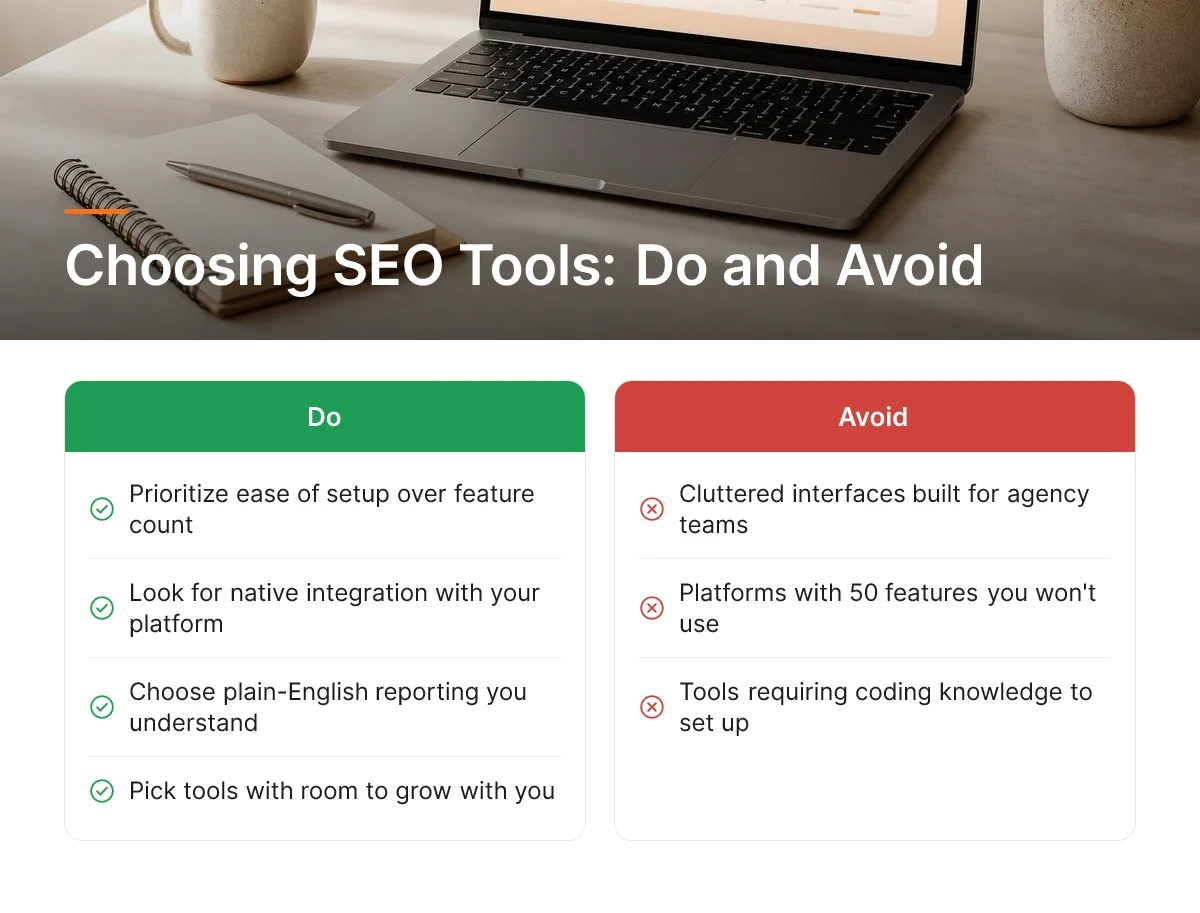
Which SEO tools are worth it for small businesses comes down to five practical filters: setup time, native integration, support quality, plain-English reporting, and room to grow. Run any tool through these before you look at feature lists.
Prioritize Ease of Setup Over Feature Count
A dashboard you actually open every week beats a platform with 50 features you never touch. Small business SEO tool comparisons often lead with feature counts, but a cluttered interface built for agency teams managing dozens of client accounts [4] wastes the time of a solo founder or shop owner who logs in between orders, not between meetings.
Test the free trial or demo with one question in mind: can you find your top keyword opportunity within two minutes of logging in? If the answer requires a tutorial video, the tool is built for someone else.
How Do You Evaluate Integration with Shopify and WordPress?
Check whether the tool connects directly to your store or site platform before you check anything else, because native integration removes manual data exports entirely. An e-commerce owner running Shopify or a B2B SaaS company publishing through WordPress shouldn't have to download a CSV, clean it in a spreadsheet, and re-upload it just to see which product pages are losing rank.
Native connections also mean the tool sees your real site structure, product categories, blog posts, landing pages, instead of a generic crawl that misses how your catalog is actually organized. That distinction matters more as your catalog or site grows past a handful of pages.
What Customer Support Differences Matter for Non-Technical Owners?
Live chat and real onboarding help matter far more than a 200-article knowledge base a busy owner will never read. Enterprise SEO platforms often assume an in-house analyst is interpreting the tool; small business owners need someone to answer "why did my traffic drop" in a sentence, not a support ticket queue with a 48-hour reply window.
Ask a support question during the trial period before you pay. The speed and clarity of that single answer tells you more about ongoing support quality than any pricing page promise.
Reporting That Tells You What to Do Next
Good reporting converts raw numbers into a next action, "add this keyword to your homepage title", instead of a spreadsheet of rankings that requires an SEO expert to interpret. Tools built for SMBs should flag the three things to fix this week, not a 40-tab export [4]. For more information, see Change Car Background Apps Vs Tools.
Check That the Tool Can Scale With You
Confirm the tool handles multiple locations, additional product lines, or new sites without forcing a disruptive switch later. A hotel chain adding a second property, or a Shopify store expanding into new product categories, shouldn't need to migrate to a different platform just because the first one only supported a single site. This is one reason Moonrank, built for daily automated publishing and AI search visibility tracking across ChatGPT, Gemini, Claude, and Perplexity at $99/month, is architected to grow with a business rather than require a re-platform once a second location or storefront comes online. When considering Which SEO tools are worth it for small businesses?, this point stands out.
What Are the Best SEO Tools for Small Businesses by Category?
Four categories cover what a small business actually needs: keyword research, rank tracking, on-page content optimization, and basic technical auditing, most SMBs can skip enterprise-grade link building entirely.
Each category answers a different question. Keyword research tells you what people are searching for and how competitive those terms are. Rank tracking tells you whether your pages are moving up or down for those terms over time. Content optimization tells you how to structure a page so it actually earns the ranking. Technical auditing catches the things that quietly tank visibility, broken links, slow load times, missing meta tags, crawl errors. A small business that's new to search optimization should answer "which SEO tools are worth it for small businesses?" by matching tools to these four jobs first, before worrying about anything more specialized.
Which Tools Work Best for Keyword Research, Rank Tracking, and Content Optimization on a Budget?
Budget-friendly options exist in every category, and a small business rarely needs the most expensive tier to get useful data. Mid-range platforms typically bundle keyword research with rank tracking, which cuts down on the number of dashboards an owner has to check weekly. Premium, enterprise-oriented platforms add deeper backlink indexes and competitor intelligence, but that depth matters more to agencies managing dozens of client accounts than to a single storefront or SaaS product tracking a few hundred keywords [4].
For content optimization specifically, the job is changing. It used to mean keyword density and header structure for Google's crawler. Now it increasingly means making content clear and well-structured enough for AI-driven answer engines to parse, summarize, and cite, a shift that traditional rank-tracking dashboards weren't originally built to measure [2].
What's the Difference Between All-in-One and Specialized Tools?
All-in-one platforms save switching costs by housing keyword data, rank tracking, and audits in one login, but each function tends to go less deep than a tool built for that single job [4]. Specialized tools do one thing well, say, backlink analysis or crawl diagnostics, but every additional tool means another subscription and another dashboard to check [2].
The decision rule is straightforward: a solo owner handling marketing alongside everything else benefits more from an all-in-one platform, since consolidation saves time even if it sacrifices some precision. A business with a dedicated marketer or small team can justify specialized, best-in-class tools per category, since someone has the bandwidth to manage multiple logins and cross-reference data.
Before paying for anything, check what's already free. Google's own tools, Search Console, PageSpeed Insights, and the Google Business Profile dashboard, cover baseline keyword visibility, site speed, and local search performance at no cost [1] [5]. Many small businesses only need a paid tool once they've outgrown what these free resources show them. Moonrank fits into this picture as a category-spanning option built specifically for how AI search engines like ChatGPT, Gemini, Claude, and Perplexity surface and recommend businesses, handling content publishing and technical optimization together rather than as separate tools to manage.
How Do You Set Up and Implement SEO Tools Without Technical Expertise?
Most SEO tools follow the same four-step setup: connect the tool to your website, verify ownership, sync your existing site data, then switch on baseline tracking, no coding required.
Connection usually means adding a tracking snippet, installing a plugin (if you run Shopify or WordPress), or linking a Google Search Console account. Verification confirms you own the domain, often through a DNS record or a meta tag the tool generates for you to paste into your site's header. Once verified, the tool pulls in your existing pages, keywords, and backlink history so you're not starting from a blank dashboard. From there, you set baseline tracking, the keywords and competitors you want monitored going forward.
What's the Typical Setup Time and Learning Curve?
The learning curve depends entirely on how much configuration the tool exposes to you. Dashboard-style tools built with guided onboarding, step-by-step wizards, pre-filled templates, default settings tuned for small sites, typically take a short, single sitting to get running. Platforms built for agencies managing dozens of client accounts expose far more configuration: custom tagging, team permissions, granular report-building. That depth is valuable for an agency managing 20 accounts [4], but it adds setup time a solo owner doesn't need to spend.
How Can Small Business Owners Automate SEO Without Hiring an Agency?
Automation is where the real time savings show up. Scheduled reports land in your inbox weekly so you're not logging in to check manually. Automated rank-check emails flag when a keyword moves up or down. Auto-generated content briefs remove the repetitive research step, pulling competitor gaps and keyword targets so you're not starting from scratch each time you write. This is the core question behind which SEO tools are worth it for small businesses: not which has the most features, but which removes the most manual work.
Some tasks still warrant outside help. Schema markup, llms.txt configuration, and deeper technical audits are one-time setup jobs worth handing to a freelancer or IT support provider if you're not comfortable editing site code, get it done once, correctly, and move on. Everyday monitoring, though, you can safely automate yourself. Moonrank, for instance, handles the technical side, schema markup, llms.txt, structured data, plus daily content publishing automatically after onboarding, so there's no ongoing manual setup at all. Automation won't remove the need to check in on strategy occasionally, but it does eliminate the daily busywork, freeing your time for decisions that actually move the business forward.
When Should a Small Business Move from Free SEO Tools to Paid Alternatives?
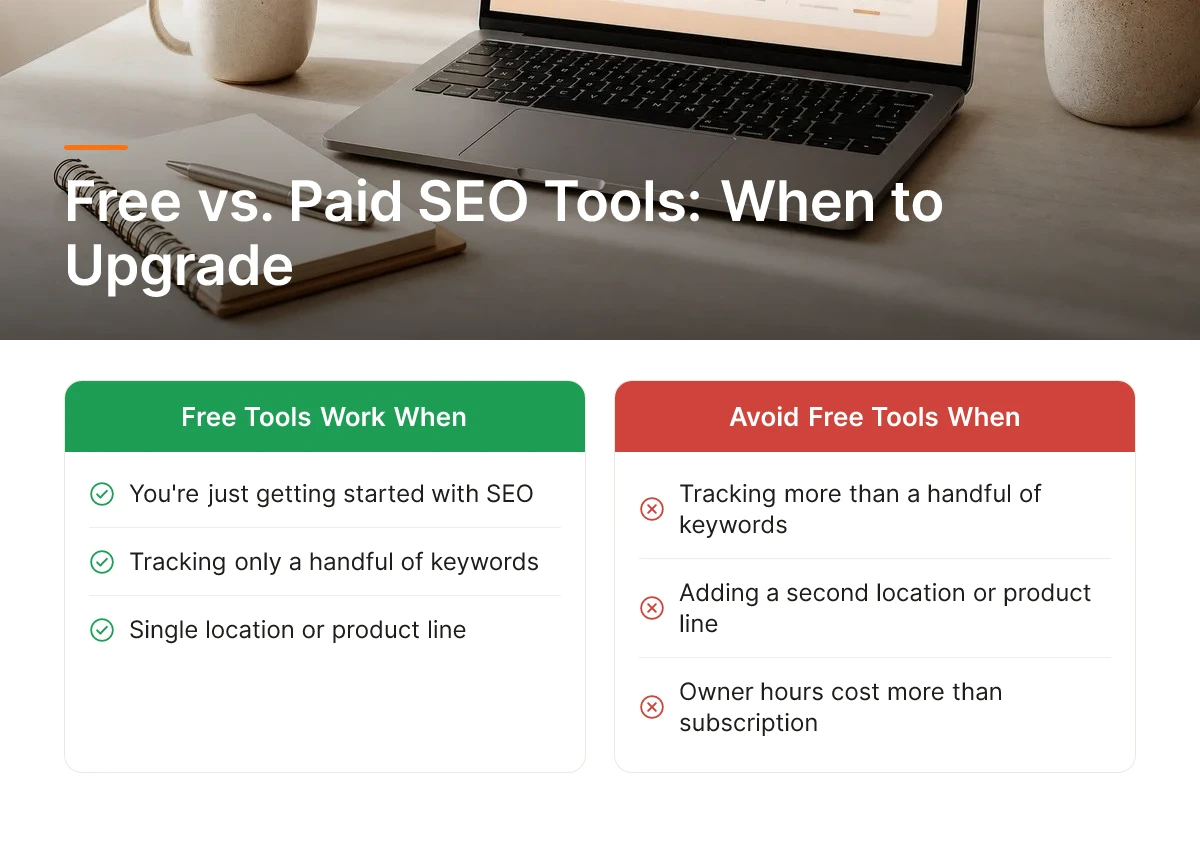
Move to paid tools when free-tier caps start costing more in owner hours than a subscription would cost in dollars, usually once you track more than a handful of keywords or add a second location or product line.
What Are the Limitations of Free SEO Tool Tiers?
Free SEO tools are genuinely useful for a business just getting started, but they come with ceilings that start to bite quickly. Most free keyword tools cap how many terms you can track at once, often in the single digits or low dozens [4]. Data also tends to refresh weekly or monthly rather than daily, which hides fast-moving changes in rankings or competitor activity. For those exploring Which SEO tools are worth it for small businesses?, this matters.
Historical trend data is another gap. Free plans typically show you a short window, 30 or 90 days, so you cannot see whether a campaign from six months ago actually moved the needle. Competitor visibility is limited too: free tools give you a snapshot of one or two competitors instead of the fuller picture needed to spot where an entire category is being recommended. Site crawlers and backlink checkers, like the free versions covered in common small business tool roundups, often cap how many pages or links they will analyze in one pass [5].
How Do You Know When Free Tools Stop Being Enough?
The clearest signal is time, not features. If you are spending more hours each week manually exporting spreadsheets, cross-referencing rankings, and stitching together competitor data than a paid tool would cost in that same time, you have already paid for the upgrade, just in hours instead of dollars.
Growth stage matters just as much as time spent. Adding a second storefront, opening a new hotel location, launching a product line, or increasing content output from one post a month to one a week all strain the rate limits built into free plans. An ecommerce store running a seasonal campaign needs to track pricing and ranking shifts across dozens of SKUs at once. A B2B SaaS company launching a new feature needs to see how competitors are being described and recommended, not just ranked. A cybersecurity vendor entering a new vertical needs keyword and competitor data that free tiers simply don't surface at scale. A hotel group adding locations needs consistent, multi-location tracking that a single free account was never built to handle.
Which SEO tools are worth it for small businesses at this stage comes down to whether the tool removes manual work or just adds another dashboard to check. This is where Moonrank fits: it tracks your visibility across ChatGPT, Gemini, Claude, and Perplexity, publishes optimized content daily, and handles the technical work, schema markup, llms.txt, structured data, automatically, for a flat $99 a month with no agency retainer. For a business that has outgrown free tools and doesn't want to hire an agency at $3,000 or more a month, www.moonrank.ai is the logical next step.
Frequently Asked Questions
Do small businesses need paid SEO tools, or are free tools enough?
Free tools cover the basics, but paid tools earn their cost once organic search becomes a real growth channel for your business. Options like Google Search Console and Google PageSpeed Insights handle fundamentals such as indexing and site speed [1]. Once you need keyword data, rank tracking, or AI search visibility, a paid platform saves hours a paid platform saves hours that free tools can't replace.
How long does it take to see results after setting up SEO tools?
Most small businesses see early signals within four to eight weeks, with meaningful ranking movement taking three months or longer. Traditional SEO depends on content indexing, backlink accumulation, and algorithm cycles. Tools that automate daily publishing, like Moonrank, tend to compress the content side of that timeline, though technical fixes and AI citation building still take weeks to fully register.
Can one person manage SEO tools alone without a marketing team?
Yes, a solo founder can manage SEO tools alone if the platform automates research, publishing, and technical fixes rather than requiring manual execution. Many small business owners already juggle Shopify, analytics, and email marketing single-handed, so the right tool needs to run without adding another daily task to their list.
What's the biggest mistake small businesses make when choosing SEO tools?
The biggest mistake is picking an enterprise platform built for agencies managing thousands of keywords [4]. That buys features a solo operation will never touch while leaving the core needs, keyword data, rank tracking, site health, and now AI search visibility, underserved relative to the price paid.
Conclusion
The right SEO stack for a small business is narrow, not broad: a technical health check, a way to see what customers actually search for, and increasingly, a way to track whether ChatGPT, Gemini, or Perplexity recommend you at all. Free tools handle diagnostics. Paid tools earn their keep only when search, including AI search, is a channel you're actively building. If your team has no time to write or publish content consistently, that gap is where automated platforms like Moonrank fit, running keyword research, technical optimization, and daily publishing without manual input. Start by auditing which of those three needs is weakest in your current setup, then test one tool against it for 30 days before committing further.
Sources & References
- 20 SEO Tools Your Small Business Needs
- 25 best SEO tools I'm using in 2026 (free + paid) | Marketer Milk
- Best SEO Tools for Small Business 2026 | Pagecontent.io
- 10 Free SEO Tools for Businesses | CO- by US Chamber of Commerce
Recommended Articles
Explore more from our content library: