How to Pick SEO Automation Software for 2026
Learn how SEO automation software helps SMBs automate content, technical fixes, and rank tracking without hiring a full agency team. Discover essential seo.

SEO automation software connects content creation, technical optimization, and visibility tracking into one system so a small team can do SEO work that would otherwise need a full agency. For SMBs, this means fewer manual hours spent on audits, keyword research, and rank checks, and more consistent output, because the software runs checks and publishes updates on a schedule instead of waiting for someone to remember to do it. The real relationship is this: automation doesn't replace SEO strategy, it removes the repetitive execution work so the business owner or small team can focus on decisions the software can't make.
What Does SEO Automation Software Actually Do for SMBs?
It takes three recurring SEO jobs, publishing, technical fixes, and rank tracking, and runs them on a schedule without anyone clicking "go" each time.
That distinction matters because most tools marketed as "automation" are dashboards. A dashboard tool pulls data, rankings, crawl errors, backlink counts, and hands it to a person who then has to decide what to do and do it manually. That's still useful, and it's what most of the category delivers: one industry roundup found that the bulk of tools in this space automate monitoring, not execution, leaving the actual work with the user [4]. Real seo automation software closes that loop. It doesn't just flag a missing meta description; it writes one and publishes it.
What's the Difference Between Automation and Just Using SEO Tools?
A tool gives you information; automation takes the action. Rank trackers and audit platforms are built to surface problems, a dropped keyword, a 404 error, a slow page, and then wait for a human to log in, interpret the report, and fix it [5]. That works fine for a team with a full-time SEO hire. It doesn't work for a shop owner who checks email between orders and has no time to interpret a crawl report, let alone act on it.
Can Automation Handle Content, Technical SEO, and Tracking All at Once?
For SMBs, the three task clusters worth automating are content publishing cadence, technical fixes and alerts (schema markup, broken links, missing structured data), and visibility or rank tracking. Running all three through one workflow, instead of stitching together separate point solutions, is what actually saves a small team time, because the alternative is manually exporting data from one tool to brief another. Moonrank, for example, bundles daily content publishing with technical audits (schema, llms.txt, citations) and AI search visibility tracking across ChatGPT, Gemini, Claude, and Perplexity into a single automated system, so a business owner isn't reconciling three subscriptions and three logins just to keep pace.
Automation still has limits. Deciding which keywords actually matter to the business, setting the brand's voice and tone, and judging how to position against a competitor are calls that require someone who understands the business, not a scheduled script. The software's job is to remove the repetitive execution so that judgment is the only thing left for a person to do.
How Much Time and Money Can SMBs Save by Automating SEO?
Switching from an agency retainer to seo automation software usually cuts recurring costs while shifting most of the workload from people to a system that runs daily.
What's the Real ROI Compared to Agency Fees and Time Savings?
An agency retainer rarely pays for execution alone. The monthly fee covers a strategist's hours planning your content calendar, an account manager relaying updates, and the reporting overhead of packaging results into a slide deck you review once a month. Moonrank's positioning compares its subscription cost directly against premium agency retainers, not because the software does less work, but because it replaces the human labor-hours behind those tasks with automated publishing and monitoring.
That reframes the cost structure. Instead of paying for someone's time every month regardless of output, you pay a flat, budget-friendly subscription and the software runs the same core tasks, audits, content drafts, rank checks, on a daily schedule.
To estimate the actual time saved, list the SEO tasks you or an employee currently do by hand:
- A technical audit run every quarter
- A content calendar updated weekly
- Rank checks run every few days
- Backlink or competitor reviews done monthly
Add up the hours each task takes, then multiply by frequency over a year. Compare that total against the setup time a tool requires upfront and the ongoing time you'll still spend reviewing what it produces, because that review time never drops to zero.
Where Do SEO Automation Tools Typically Fail?
Two failure modes show up often. The first is over-automating content without review: publishing daily articles with no human check on quality produces generic, repetitive output that reads like it was written for a search engine, not a customer, which hurts the trust signals AI engines and readers both rely on. The second is alert fatigue, where a tool configured to flag every technical anomaly buries the handful of issues that actually matter under a flood of low-priority notifications [5].
Automation reduces the hours a task takes. It doesn't remove the need for someone to look at what came out the other end. The ROI case for seo automation software holds up when a business owner still spends a little time each week scanning published content and visibility reports, not when they assume the system runs itself with zero oversight.
What to Look for When Choosing an SEO Automation Tool
Match the tool to your site type first, then check integration depth and scale limits, feature lists matter less than fit. The best seo automation software for a five-person SaaS company looks nothing like the right pick for a 3,000-SKU Shopify store.
How Do You Evaluate Automation Across Site Types (Ecommerce vs SaaS vs Publishers)?
An e-commerce store needs technical checks that work at product-page scale, schema markup for listings, price and availability data, and out-of-stock detection across thousands of SKUs, not just the homepage and category pages. A B2B SaaS site has fewer pages but needs stronger topic and content-coverage tracking, since buyers research in long cycles and expect depth across a narrower set of product and use-case pages. Publishers sit at the other extreme: crawl frequency and indexing speed matter more than almost anything else, because a story published at 9 a.m. is worthless if it is not indexed until the next day.
Testing a tool against your actual site type, not a generic demo account, is the only way to know if it holds up. A tool built around blog-style content calendars may stall when asked to generate schema for 2,000 product variants, and one of the clearer splits in the market is between tools that automate monitoring and reporting versus tools that automate execution end to end [4].
What API Limits and Scalability Constraints Should You Watch For?
Ask what happens once your site crosses a few thousand pages, many tools built for small sites quietly throttle crawl frequency or reporting cadence as volume grows. Some platforms cap API calls per day or per plan tier, which means rank tracking or technical audits run less often exactly when you need them more. A tool built for enterprise-scale crawling may handle volume fine but come with a learning curve and price tag out of reach for a team with no dedicated SEO hire [3].
Core capabilities worth checking regardless of site type:
- Scheduled publishing that runs without manual approval steps
- Automated technical audits that catch schema and crawl errors
- Visibility tracking across both traditional search and AI engines (ChatGPT, Gemini, Claude, Perplexity)
- Integration depth with your CMS, analytics stack, and existing workflow
Moonrank builds its tracking layer around exactly this split, since a product page ranking on Google and a brand showing up in an AI recommendation are two different problems.
Integration depth with your CMS, analytics stack, and existing workflow matters more than raw feature count. A tool with fifty features that does not connect to your Shopify admin or your existing analytics dashboard creates more manual work, not less, the opposite of what a small team without a dedicated SEO hire needs.
How to Set Up and Integrate SEO Automation Into Your Workflow
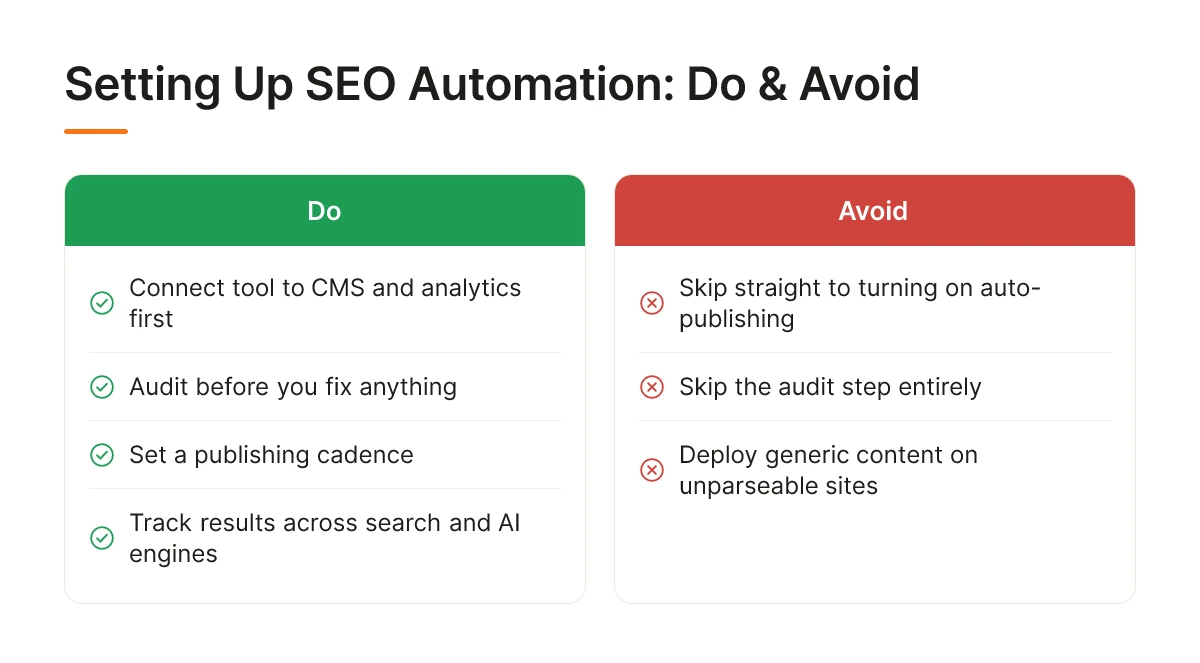
Getting seo automation software live takes four steps: connect your data, audit before you fix, set a publishing cadence, then track results across both search engines and AI answer engines.
Most SMB owners skip straight to turning on auto-publishing and skip the audit step entirely. That's the fastest way to end up with generic content sitting on top of a site that AI engines still can't parse correctly.
What's a Step-by-Step Process for Getting an Automation Tool Live?
Step 1: Connect the tool to your CMS and analytics first. Before any automation tool touches your site, it needs to read your existing content, traffic patterns, and current rankings. Connecting Shopify, WordPress, or whatever CMS you run, along with Google Analytics and Search Console, gives the software a baseline to work from instead of guessing.
Step 2: Run a technical audit and decide what gets fixed automatically. Schema markup, broken internal links, and missing structured data are typically safe to auto-fix. Decisions that affect brand voice or page structure should route to you for approval first. A clear split here prevents the tool from making changes you'd have vetoed.
Step 3: Set your publishing cadence and approval checkpoints. Daily publishing only works if the content matches how your business actually talks. Review the first two to three weeks of output closely, then loosen the review checkpoint once you trust the pattern.
Step 4: Turn on visibility tracking across search and AI engines. Define what counts as progress, mentions in ChatGPT or Perplexity responses for your category, citation frequency, or movement on target keywords, and check it weekly, not daily. AI visibility moves slower than traditional rank tracking, so weekly review avoids chasing noise.
How Do You Connect It to Your Existing Tools and Systems?
Connect through native integrations where they exist, and avoid letting two tools write to the same field. If you already run a basic SEO plugin like Yoast, decide upfront whether the automation tool or the plugin owns meta descriptions and schema, running both without a clear owner creates conflicting edits that confuse crawlers.
Moonrank handles this by pulling CMS and analytics data during onboarding, then running daily content generation and technical fixes without requiring you to manage overlapping tools or manual handoffs [4]. The goal is one system of record for your SEO data, not three dashboards telling you different things.
Which SEO Automation Features Matter Most for Your Business Type
The right mix of features depends on what your buyers research before they convert, not on a generic checklist of SEO tasks. An ecommerce store and a cybersecurity vendor sell nothing alike, so the automation priorities shouldn't look alike either.
What Automation Features Matter Most for SMBs Competing Without an Agency?
Ecommerce stores need automated technical checks on product pages, broken links, missing meta tags, duplicate titles, along with schema markup for listings and reviews so AI engines can read prices, availability, and ratings directly. Seasonal content refresh matters too: a holiday gift guide or a back-to-school collection page loses relevance fast if nobody updates it, and manual refreshes rarely happen on schedule when you're running a small team.
B2B SaaS companies live or die on feature-page coverage. Every product update, integration, or pricing tier change creates a content gap if the site doesn't keep pace, and buyers comparing tools often ask AI engines direct questions about specific features. Automated tracking of which topics and feature pages are thin, paired with content generation tied to product releases, keeps the site aligned with what the product actually does.
Cybersecurity vendors sell into a buying process that's almost entirely research-driven before a single sales call happens. Authority-building content published on a steady cadence, combined with technical trust signals like schema markup and visible security indicators, matters more here than almost any other sector because buyers are vetting credibility long before they fill out a contact form.
Hotels depend on local and location-page automation, city-specific landing pages, neighborhood guides, proximity to attractions, plus review signal tracking, since star ratings and recent reviews factor heavily into both traditional rankings and AI trip-planning answers. Showing up when someone asks an AI engine for a hotel recommendation in a specific city requires the same location-based structured data that used to matter for Google Maps packs, now extended to conversational queries.
How Do Enterprise-Grade Tools Compare to Affordable Options for Small Teams?
Enterprise SEO platforms offer deep configuration, custom workflows, granular permissions, extensive API access, built for teams with dedicated SEO staff to manage them [3]. That depth comes at a premium cost tier and a steeper setup curve, which is exactly why platforms built for enterprise scale often frustrate small teams who just need results fast [3].
Budget-friendly seo automation software trades some of that configuration depth for faster setup and a narrower, more focused scope. Moonrank, for instance, runs daily content publishing and technical optimization, schema markup, llms.txt, citations, on autopilot for a flat monthly cost, aimed squarely at businesses that need results without hiring a specialist to run the tool.

Frequently Asked Questions
Can SEO automation software replace an SEO agency entirely?
For most SMBs, yes, automation now covers what agencies charge the most for: content publishing, technical fixes, and visibility tracking. Agencies still add value for complex strategy work like large-scale link building or enterprise site migrations. But a restaurant, Shopify store, or small SaaS company rarely needs that depth, and paying a premium monthly retainer for tasks a tool handles on autopilot stops making sense.
How long does it take to see results after automating SEO tasks?
Technical fixes like schema markup can show up in AI search crawls within days, while content-driven visibility gains typically take four to eight weeks. Daily publishing builds authority gradually, it's not instant, but it compounds faster than manual, inconsistent posting.
Does SEO automation work for very small sites with limited content?
Yes, small sites often benefit most, since automation fills content gaps that a solo founder never has time to address manually. A five-page Shopify store with no blog history can go from invisible to indexed and cited within a few months of consistent, automated publishing.
What happens if automated content doesn't match my brand voice?
Quality tools personalize output using your niche, keywords, and competitive context rather than publishing generic text. Moonrank, for example, builds content around your specific business inputs during onboarding, not a one-size-fits-all template. Still, review published content periodically, automation reduces manual work, but it shouldn't mean zero oversight of what represents your brand.
Is SEO automation software only useful for traditional search, or does it help with AI search visibility too?
It helps with both, though the technical requirements differ, traditional search rewards backlinks and keyword density, while AI engines like ChatGPT, Claude, and Perplexity rely on structured data, citations, and llms.txt files to parse and trust your content. Moonrank focuses specifically on this second layer, tracking how your business appears across AI search engines alongside standard optimization.
Conclusion
Automating SEO isn't about replacing judgment, it's about removing the daily grind of content publishing, schema updates, and visibility checks that most SMB owners never have time for. The businesses that gain ground are the ones that automate consistently, not occasionally: daily content and continuous technical fixes compound in ways a monthly agency report never can.
Start by auditing whether your site currently shows up when someone asks ChatGPT or Perplexity for a recommendation in your category. If it doesn't, that's the gap to close first. Try Moonrank's 3-day free trial to see your current AI search visibility and what automated fixes would change.
Sources & References
- Navigate the SEO Automation Tools Landscape: A Strategic Guide for Enterprises
- 12 Best Automated SEO Software Tools for 2026 (Tested) | Distribb
- SEO Automation Software: Monitor, Track & Report | SEOcrawl AI
Recommended Articles
Explore more from our content library: