A Complete Guide to SEO for Webflow in the Age of AI Search
Learn how SEO for Webflow works for Google and AI engines like ChatGPT, covering schema, crawlability, content strategy, and visibility tracking.

SEO for Webflow works differently depending on whether you're optimizing for Google or for AI search engines like ChatGPT and Perplexity. Webflow's built-in tools (clean code output, fast hosting, editable metadata) give you a solid technical base, but AI engines weight things Google doesn't emphasize as heavily, clear entity definitions, structured data that states facts plainly, and content that directly answers specific questions. Getting recommended by AI search means pairing Webflow's technical strengths with content built to be quoted, not just ranked. This is the foundation of doing seo for webflow well in an AI-first search landscape.
How Do You Optimize a Webflow Site for AI Search Engines Like ChatGPT and Perplexity?: seo for webflow
Optimizing a Webflow site for AI search means writing for extraction, not just ranking, AI engines pull specific passages to answer a question, not just crawl pages to rank them.
What's the Difference Between Optimizing for Google and Optimizing for AI Search Engines?
Google's model is built on ranking and linking: it crawls a page, indexes it, and ranks it against competing pages based on relevance signals and backlinks, then sends the user to click through. AI engines like ChatGPT and Perplexity work differently, they summarize and recommend. Instead of returning a list of links, they read across multiple sources, extract the passages that answer the question directly, and generate a single response that may name your business or a competitor's [1].
That shift changes what's worth prioritizing. A page written to persuade, heavy on adjectives, light on specifics, gives an AI engine nothing clean to quote. A page that states a direct answer ("Our shipping policy is 3-5 business days for US orders" or "Plan A includes X, Plan B includes Y") gives the engine a passage it can lift with confidence. Definitions, comparisons, and specific claims tend to get quoted more often than marketing copy, because AI models are trained to extract facts, not tone [3]. This is the core of seo for webflow done well: the writing has to work as a source, not just as a page.
How Do Structured Data and Metadata on Webflow Affect AI Search Indexing?
Structured data, often called schema markup, is a small block of code that labels your content in plain terms so a machine can tell what it's looking at: this is a product, this is its price, this is a review, this is an FAQ. Webflow supports this through a custom schema field available on both static pages and CMS collection pages, letting you describe a product or service in plain factual language without touching a developer's codebase [3]. Pairing that with clean metadata, accurate titles, descriptions, and heading structure, gives AI crawlers a clearer read on what your business actually does [1].
On-site work is necessary but not sufficient. AI engines also pull from third-party mentions, reviews, directory listings, forum threads, comparison articles, when deciding what to recommend [2]. A Webflow site with perfect schema but zero outside mentions still has a visibility gap. Moonrank addresses both sides of that gap at once: it handles the technical layer (schema markup, llms.txt, structured data) on your site while building the citations and daily content that give AI engines more reasons to trust and mention your business elsewhere. This combined approach is what makes seo for webflow effective rather than partial.
What Technical SEO Does Webflow Handle, and What Gaps Do You Need to Fill?
Webflow automates the technical basics well, clean HTML, sitemaps, and SSL, but AI crawlers need more structure than that to trust and cite your pages.
Out of the box, Webflow generates clean semantic HTML without the bloated div structures that older page builders produce, which matters because AI crawlers parse a page's underlying structure to understand what's a heading, a product, or a testimonial. It also auto-generates an XML sitemap, provisions hosted SSL on every plan, compresses images on upload, and gives editors direct control over alt text and meta tags at the page level. For a solo founder without a dev team, that's a genuinely solid starting point, most of the plumbing traditional CMS platforms require plugins for is already wired in.
Does Webflow Handle Core Web Vitals and Site Speed Well Enough for AI Crawlability?
Webflow sites generally perform well on Core Web Vitals because Webflow serves pages through a global CDN, but that advantage erodes fast once you add heavy interactions [1].
Page speed and technical health directly shape how AI search engines evaluate a page, Webflow's own research frames AI search optimization around making pages easy for these systems to parse and trust [1]. The mechanism to watch is render-heavy design: parallax scrolling, large background videos, and uncompressed image exports all add load weight that a CDN can't fully offset. A restaurant site with a hero video that hasn't been compressed, or a Shopify-adjacent product catalog with dozens of full-resolution lifestyle images, will still score poorly no matter how good Webflow's hosting infrastructure is underneath it.
What Are Webflow's Crawlability Limitations Compared to Traditional CMS Platforms?
Webflow's reliance on JavaScript for certain interactions and its CMS Collection pagination limits can restrict how completely AI crawlers traverse a site [3].
Some interactive elements render client-side, which some AI crawlers handle inconsistently depending on how they fetch and parse pages, unlike a traditional CMS where content is typically served as static HTML by default [3]. CMS Collection list pagination can also cap how many items a crawler sees in one pass, which matters for e-commerce catalogs or large blog archives trying to get every product or article indexed by an AI system. This is one of the practical differences that separates SEO for Webflow from SEO on a standard database-driven CMS: the platform is fast and clean, but a few structural quirks need deliberate workarounds rather than assuming they resolve themselves.
The gaps you still have to fill yourself are the ones with the most AI-visibility impact: an llms.txt file, a plain-text file that tells AI crawlers what to prioritize on your site, FAQ schema markup added through Webflow's custom code embeds, and consistent entity information (your business name, address, and category) repeated identically across every page [3]. Webflow doesn't generate any of these automatically. Moonrank closes this gap by handling llms.txt configuration, schema markup, and citation building as part of its daily technical optimization layer, so Webflow store owners and B2B SaaS teams don't have to hand-code embeds themselves.
How Does Webflow Compare to WordPress and Other Platforms for AI Search Visibility?
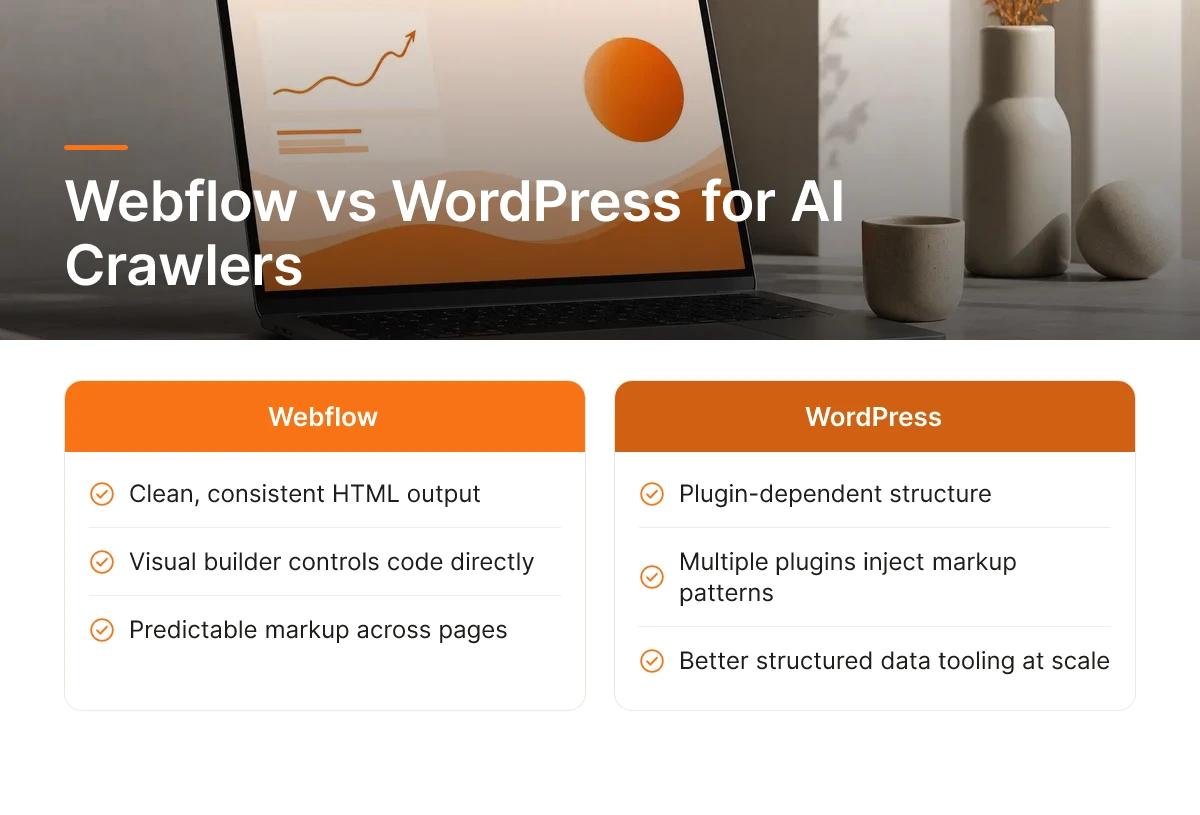
Webflow's clean, consistent HTML output tends to give AI crawlers an easier time than WordPress's plugin-dependent structure, though WordPress still wins on structured data tooling at scale.
Webflow generates the same predictable markup across every page because the visual builder controls the underlying code directly, rather than routing it through a stack of third-party plugins. WordPress sites often rely on five or six plugins working together, one for SEO tags, another for page builders, another for caching, another for schema, and each one can inject its own markup patterns, redundant scripts, or conflicting metadata. Answer engines parsing a site for retrieval need to extract clean entities and facts quickly, and fewer moving parts generally means fewer parsing errors. This is one reason Webflow AEO discussions increasingly frame the platform's semantic HTML and Webflow's native handling of heading hierarchy and code cleanliness as a structural advantage for AI crawlers over the patched-together output common on plugin-heavy WordPress builds [3]. That said, WordPress hasn't lost every advantage. Its plugin ecosystem for structured data, content workflows, and large-scale publishing is more mature simply because it's been around longer and serves a much larger install base. A content operation publishing hundreds of pages a month with complex taxonomy needs may still find WordPress's tooling more flexible, even if it takes more configuration to keep that markup clean.
Is Webflow Better or Worse Than Wix, Squarespace, and Framer for AI Search Recommendations?
Webflow gives more direct control over structured data and CMS architecture than Wix or Squarespace, and matches or exceeds Framer on content flexibility for AI-readable pages.
Wix and Squarespace prioritize drag-and-drop simplicity, which often means limited access to custom schema markup and rigid CMS collections that don't map cleanly to topic clusters. Webflow's CMS Collections let a business structure product pages, blog posts, or service pages as distinct, interlinked content types, closer to how AI retrieval systems expect entities and relationships to be organized [3]. Framer has improved on structured content in recent versions, but Webflow's longer track record with custom code embeds for FAQ and Article schema still gives it an edge for teams doing serious seo for webflow work rather than relying on templates alone.
Can You Migrate to Webflow Without Losing AI Search Visibility and Rankings?
Yes, migrating to Webflow preserves AI search visibility if you map every old URL to its new equivalent with 301 redirects before launch.
Start by exporting a full list of existing URLs and matching each one to its new Webflow path, then set up 301 redirects so no page returns a dead link. Carry over metadata, titles, descriptions, alt text, and rebuild any structured data that existed on the old site, since losing schema markup during a migration can quietly erase the signals AI engines used to trust the domain. After launch, crawl the new site for broken internal links and orphaned pages; a Webflow migration handled carelessly can strand months of accumulated citations and rankings in a matter of days. A migration checklist built around seo for webflow best practices prevents most of this damage before it happens.
What Content Strategy Works Best on Webflow to Attract AI Search Recommendations?
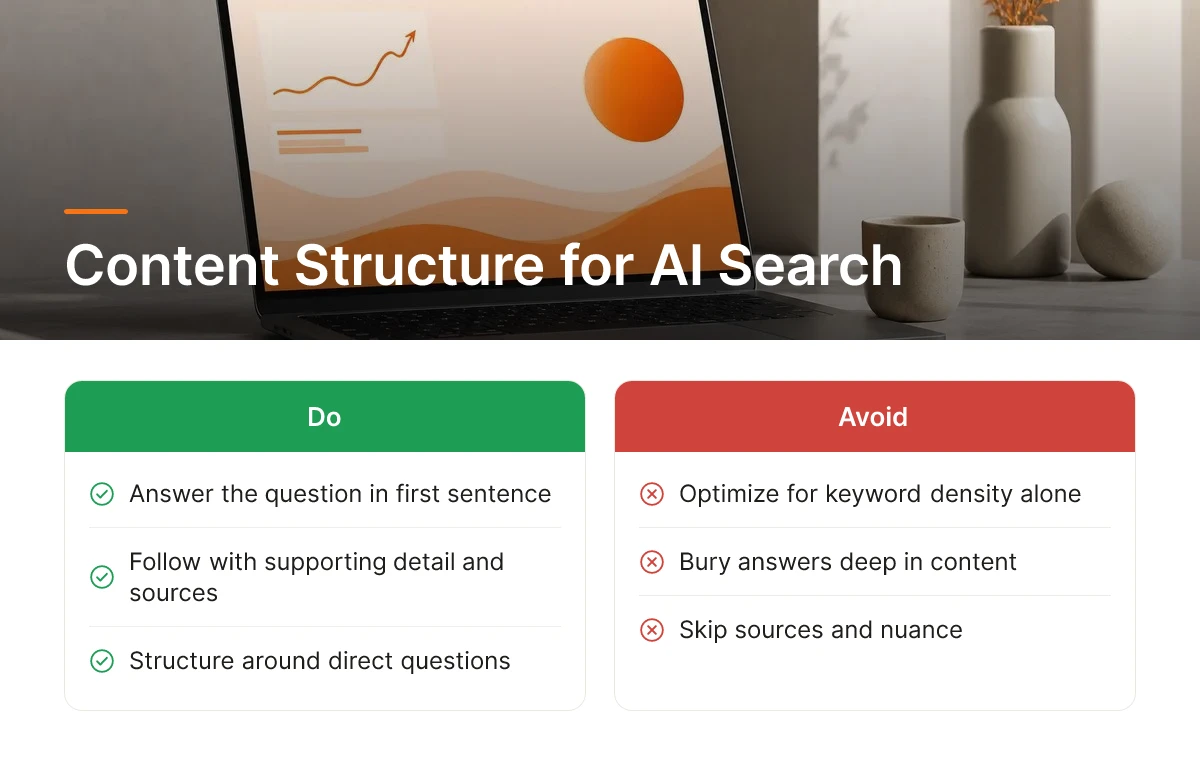
Content built around direct questions, answered plainly in the first sentence, gets pulled into AI answers far more often than content optimized for keyword density. That single shift, answer first, elaborate second, is the core of effective seo for webflow content, and it changes how you should build every blog post, service page, and CMS collection on the site.
How Should You Structure Blog Posts and Content on Webflow for AI Search?
Structure every page so the first sentence after a heading states the answer, then follow with supporting detail, sources, and nuance. AI engines extract passages, not full articles, so they favor content where the answer sits in a clean, standalone sentence rather than buried after three paragraphs of preamble [3]. This mirrors the retrieval logic behind tools like ChatGPT and Perplexity, which scan for text they can quote directly and independently verify [3].
Webflow's CMS Collections are the practical tool for this. Instead of one-off blog posts, build repeatable content types, comparison pages, service pages, FAQ hubs, that follow the same structure every time [2]. Consistency across a collection reinforces that your site represents a single, coherent entity (your business, your niche, your expertise), which is exactly the kind of signal AI systems use to decide who to trust and cite [3]. Add internal links between related CMS items so a service page links to its comparison page, which links to a relevant case study, reinforcing the topical relationships that answer engines look for [1].
How Does Audience-First Content Strategy Differ for AI Search vs. Google?
Writing for Google rewarded keyword variation and volume; writing for AI search rewards clarity about who the content serves and what question it resolves [1]. AI engines prioritize passages that serve a specific reader intent cleanly over pages stuffed with synonym-heavy phrasing aimed at ranking for ten variations of the same term. A page that clearly answers "how much does a Shopify migration cost for a 50-SKU store" outperforms a generic page targeting "ecommerce migration" with padded keyword repetition. Practically, this means:
- Use H2s phrased as real questions a customer would type into ChatGPT or ask a colleague, not fragments like "Pricing Overview."
- Open every section with a short, definitive sentence, no throat-clearing.
- Write for one reader type per page (a B2B SaaS buyer, not "everyone"), rather than trying to capture every possible search variant.
Moonrank applies this structure automatically across daily published content, formatting posts with question-based headings and direct-answer openings while also handling the schema markup and llms.txt configuration that help AI systems parse and trust a Webflow site's structured data. Teams that adopt this approach tend to see seo for webflow efforts compound over time rather than plateau after the initial setup.
What Tools and Workflows Help You Track Webflow's AI Search Visibility?
Tracking AI search visibility means running test prompts against ChatGPT, Perplexity, and Claude on a schedule and logging whether your brand shows up, because none of these engines publish a dashboard of your impressions.
How Do You Measure Whether Your Webflow Site Is Getting Recommended by ChatGPT, Perplexity, and Claude?
There's no Search Console equivalent for AI engines, no query report showing impressions, click-through rate, or ranking position. Instead, visibility has to be inferred by asking the engines directly and watching what comes back.
A workable manual process looks like this: write down the 15-20 questions a real customer would ask about your category ("best project management tool for construction teams," "top boutique hotels in Charleston"), then run those exact prompts through ChatGPT, Perplexity, and Claude on a recurring basis, weekly is a reasonable cadence. Log whether your business appears, whether competitors appear instead, and which sources the engine cites as its reasoning. Perplexity in particular shows its source list, which makes it easier to see whether your Webflow pages are even in the citation pool.
Do this consistently and patterns emerge: certain topics where you're cited reliably, others where a competitor's page keeps winning the citation. That gap is the actual optimization target, not a keyword ranking, but a citation slot inside a generated answer. Treating this gap as the real measure of seo for webflow progress keeps the work focused on outcomes rather than vanity metrics.
What Automation Can Replace Expensive Agency Work for AI Search Optimization?
Running that prompt-logging workflow by hand across three engines, multiple topics, and a weekly cadence adds up fast for an owner-operator who's also running the business. It's the kind of repetitive, structured task that doesn't need a person doing it manually every week, it needs monitoring software and a publishing schedule that doesn't depend on someone remembering to do it.
The technical side compounds the problem. Schema markup, llms.txt configuration, and structured data aren't one-time setup tasks, they need checking every time you add products, change service pages, or restructure your Webflow CMS collections. An agency will bill hourly or monthly for this upkeep; a solo founder usually just lets it lapse after the initial launch.
This is the gap Moonrank is built to close for seo for webflow specifically: it tracks how your business appears across ChatGPT, Claude, Perplexity, and Gemini, publishes fresh optimized content to your site daily, and keeps schema markup, llms.txt, and structured data current, all without you writing a prompt log or hiring an agency at premium retainer rates. For a Webflow store or B2B SaaS site trying to stay visible as AI search keeps eating into click-through traffic, that ongoing automation matters more than getting the initial setup right once. See how it works at www.moonrank.ai.

Frequently Asked Questions
Does Webflow support the schema markup needed for AI search engines?
Yes, Webflow supports the schema markup AI engines need, added through custom code embeds since there's no native schema generator built in [3]. You can add FAQ schema, Article schema, and structured data manually on any page or CMS template, which gives AI crawlers the clean, parseable signals they look for when deciding what to cite [3].
Do you need a developer to optimize a Webflow site for AI search?
Not necessarily, but some tasks, like custom schema embeds, go smoother with technical help. Webflow's visual editor handles headings, meta tags, and content structure without code. For schema markup and llms.txt files specifically, many SMB owners use an automated tool instead of hiring a developer for one-off fixes.
How long does it take to see AI search results after optimizing a Webflow site?
Most sites need eight to twelve weeks of consistent optimization before AI engines start citing them regularly. AI crawlers need to re-index your pages, and citation-building takes time to accumulate across review sites, forums, and third-party mentions [3]. Sites that publish fresh content daily tend to get indexed and trusted faster than those updated occasionally.
Can a Webflow blog alone improve AI search visibility, or does the whole site need work?
A blog alone isn't enough, AI engines evaluate the whole site's structure, technical signals, and external trust, not just blog content. Topical clusters built through CMS Collections help [3], but they need to pair with clean semantic markup, schema, and citations elsewhere on the web. Treat the blog as one piece of a larger technical and content strategy, not the whole strategy.
Is seo for webflow different for an e-commerce store than for a B2B SaaS site?
The fundamentals stay the same, but the emphasis shifts. An e-commerce store doing seo for webflow needs product and review schema plus clean CMS pagination so catalogs stay fully crawlable, while a B2B SaaS site benefits more from comparison pages, case studies, and FAQ schema that answer buyer-evaluation questions directly. Both still depend on the same technical base: clean markup, llms.txt, and consistent entity information.

Conclusion
Webflow gives you the technical flexibility AI search engines reward, clean semantic HTML, CMS Collections for topical clusters, and custom code embeds for schema markup [3]. What most SMB owners lack isn't the platform, it's the daily discipline: fresh content, consistent citations, and monitoring across ChatGPT, Gemini, Claude, and Perplexity. Start by auditing whether your current pages answer real customer questions directly, then check if your schema and llms.txt setup exists at all. If you'd rather not build and maintain that manually, Moonrank handles the daily content publishing, technical optimization, and AI visibility tracking for seo for webflow, visit www.moonrank.ai to see how it works with your Webflow site.
Sources & References
- 5 answer engine optimization strategies for AI search | Webflow Blog
- 10 Best Webflow Agencies for ChatGPT + Perplexity 2026
- Webflow AEO: How to Get Cited by ChatGPT & AI Search
Recommended Articles
Explore more from our content library: