Practical SEO for Squarespace Websites in the AI Search Era
Learn how SEO for Squarespace websites works with AI search engines like ChatGPT and Perplexity, plus how to fix crawl gaps and boost visibility.

Understanding seo for squarespace websites is essential. AI search engines like ChatGPT and Perplexity discover Squarespace websites the same way they discover any site, by crawling available HTML, reading structured metadata, and pulling from indexed pages, but Squarespace's closed platform limits how much of that signal you control. You can't edit robots.txt directly, schema markup options are limited to what Squarespace auto-generates, and server response settings are fixed. That means strong on-page basics (titles, descriptions, headings, fast-loading pages) matter even more, since you can't layer on the deeper technical fixes available with open platforms.
How Do AI Search Engines Discover and Recommend Squarespace Websites?
AI engines find Squarespace pages through the same crawlers and indexes that power traditional search, not through a separate submission or approval process. ChatGPT, Perplexity, and Google's AI Overview pull from existing web indexes and real-time crawls, scanning the HTML a page actually sends to a browser, rather than registering sites through some dedicated AI-search directory [1].
That matters for anyone thinking about SEO for Squarespace websites, because it means there's no shortcut around having a crawlable, well-marked-up page in the first place. If a crawler can't reach a page or can't parse what it says, no AI engine will ever cite it, regardless of how good the content looks to a human visitor.
What Metadata and Content Signals Do AI Search Engines Prioritize?
AI engines weight title tags, meta descriptions, and header hierarchy heavily because these elements tell a crawler what a page is about before it reads a single paragraph. Squarespace's help documentation confirms that AI-powered engines look for sites that are "organized and written clearly," favoring content that states facts directly over content that implies them through design or tone [1].
Clear, declarative statements, a service described in a plain sentence rather than buried in a hero banner graphic, get pulled into AI summaries more often. Squarespace itself advises using clear language and avoiding keyword stuffing, since answer engines are matching phrasing to user questions, not just scanning for repeated terms [1].
How Does Squarespace's Site Structure Affect Crawlability?
Squarespace's template system organizes content into navigation menus, collections, and blog structures that generally produce clean, crawlable HTML, but gaps in internal linking or deeply nested pages can still leave sections unreached. A page that's three or four clicks from the homepage with no internal links pointing to it is harder for a crawler to find and harder for an AI engine to judge as trustworthy [1].
Squarespace has also closed some of the older technical gaps that used to complicate crawlability, including issues with duplicate content and URL handling that were common criticisms of the platform in earlier years [4]. The structure itself isn't typically the blocker today, thin or scattered content within that structure is.
AI engines consistently favor pages built around extractable answers, a direct statement of what a business does, where it operates, and what makes it different, over pages that rely on photography, scroll animations, or image-based text to make that case. That's a common Squarespace pitfall, since the platform's design strength (polished visual templates) can work against AI discoverability if every key fact lives inside an image rather than readable HTML [2]. A restaurant's menu highlights or a SaaS product's core features need to exist as real text somewhere a crawler can parse, not just as a styled graphic.
What Technical SEO Limitations Does Squarespace Have for AI Search Visibility?
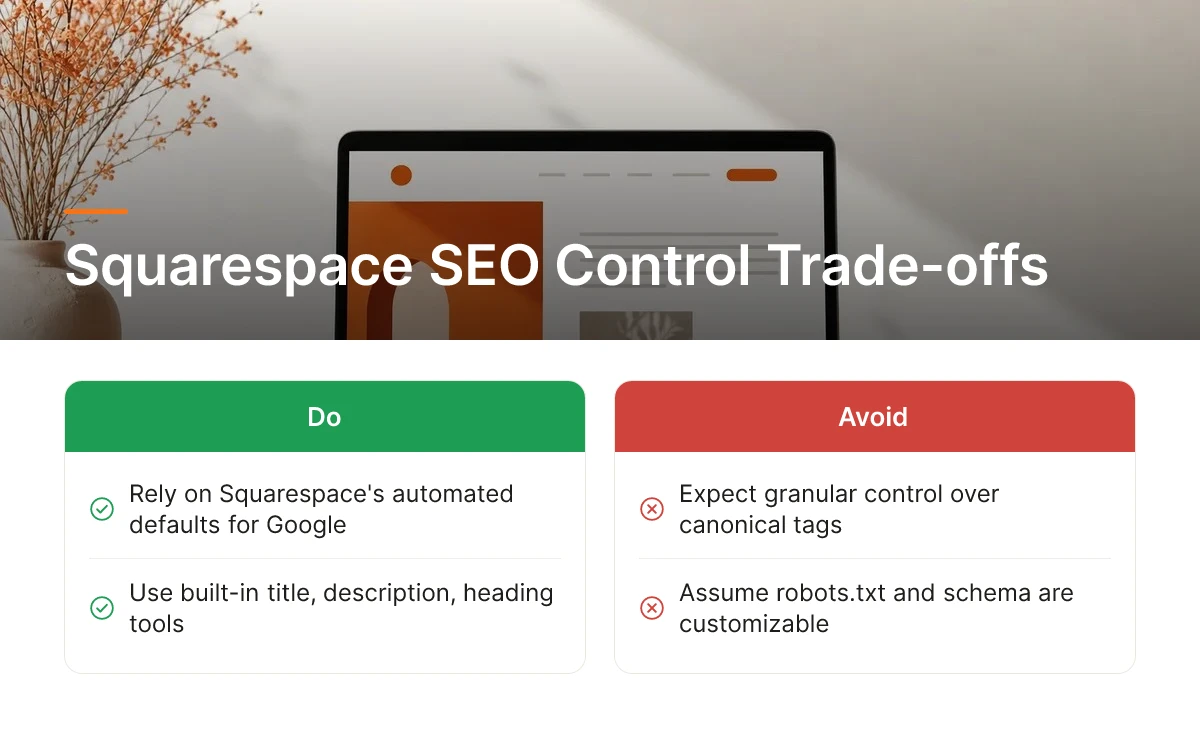
Squarespace automates canonical tags, robots.txt, and schema markup rather than letting you edit them directly, which limits how precisely you can signal page priority and structure to AI crawlers. For traditional Google ranking, these defaults are usually good enough. For AI search visibility, where a model is deciding which single source to cite or recommend, that lack of control becomes a bigger liability. Anyone serious about seo for squarespace websites needs to know which limitations are fixed platform behavior and which can still be worked around.
Can You Customize Canonical Tags, Robots.txt, and Schema Markup on Squarespace?
Not in any granular way, Squarespace generates canonical tags and robots.txt automatically, and site owners cannot edit either file directly [1]. That matters for duplicate content: if your store has similar product variants or your blog republishes content across collections, you can't manually point crawlers to the preferred version. Squarespace's system usually makes a reasonable choice, but you lose the ability to correct it when it doesn't.
Schema markup follows the same pattern. Squarespace applies a fixed set of structured data automatically, things like organization and basic page markup, but doesn't support custom schema types such as FAQ, product review, or how-to markup without third-party code injection [1]. AI search engines rely heavily on structured data to understand what a page actually offers before deciding whether to cite it [3]. Without FAQ or review schema, a Squarespace product page or service listing gives an AI crawler less to work with than a comparable page on a platform built for custom markup. This is one of the clearest gaps in seo for squarespace websites compared to open platforms where developers can inject any schema type they need.
How Do Page Speed and Server Response Times Impact AI Crawling?
Slow page loads and sluggish server responses risk AI crawlers timing out before they fully render your content, which means your page simply doesn't get read. AI-powered search tools look for sites that are organized and load cleanly enough to extract a reliable summary [1]. If a crawler hits a page that takes too long to respond, it may skip deeper content entirely, missing text that would otherwise support a citation.
This isn't unique to Squarespace, but site owners have less control over server configuration than they would on a platform where they manage hosting directly. You can still improve speed through image compression and reducing heavy page elements, but you can't tune server-level settings the way a custom-built site allows.
The main fixed constraints worth keeping in mind when planning seo for squarespace websites include:
- No direct editing of robots.txt or canonical tags, both are generated automatically by the platform
- Schema markup limited to default types unless extended through code injection
- Server response and hosting configuration managed entirely by Squarespace, with no owner-level tuning
- No native llms.txt support for AI crawler configuration
- Image-heavy templates that can hide key facts from text-based crawlers if not paired with real HTML content
None of this makes Squarespace unusable for AI search, it means business owners need to work within fixed boundaries rather than open configuration. Compared to more customizable platforms, Squarespace trades flexibility for ease of use, and that trade-off shows up directly in how much structured signal you can hand an AI crawler.
Which Built-In Squarespace SEO Features Actually Help with AI Search Discovery?
Some Squarespace tools carry over directly to AI search; others were built for Google's crawler logic and only help indirectly. Knowing which is which matters when you're planning seo for Squarespace websites with limited time and no agency budget.
Do Squarespace's Title, Description, and Heading Tools Work the Same Way for AI Search as for Google?
Title tags, meta descriptions, and heading structure help both systems, but AI engines weight them differently than Google does. Google has historically rewarded keyword placement and density inside these fields. AI-powered search engines, including Google's own AI Overview, Bing's Copilot, and Perplexity, prioritize sites that are organized and written in clear, factual language over sites stuffed with repeated keywords [1]. Squarespace's native title and description fields still matter, they're often the first text an AI crawler encounters, but the copy inside them needs to read like an answer to a question, not a keyword list. A heading like "Best Hiking Boots for Wide Feet" works better for AI citation than "Hiking Boots | Buy Hiking Boots Online | Wide Hiking Boots."
How Effective Is Squarespace's SSL, Alt Text, and Structured Data Support for AI Recommendations?
SSL encryption, alt text, and Squarespace's native structured data each play a role, but none of them differentiate one site from another anymore. SSL is a baseline expectation, both Google and AI crawlers treat an unencrypted site as untrustworthy by default, so having it active just keeps you in the running rather than giving you an edge.
Alt text does double duty. It's an accessibility requirement, but it's also a content signal AI engines rely on when they can't fully render or interpret an image, a product photo or infographic with clear, descriptive alt text gives an AI crawler something factual to cite even if it skips the visual entirely.
Structured data is where Squarespace's built-in support runs thin. The platform automatically generates basic schema for things like organization details and blog posts, which helps crawlers confirm who you are and what you publish [1]. But it doesn't natively support the deeper schema types, product specifications, FAQ markup, review aggregates, that AI engines increasingly favor when deciding what to cite [3]. For ecommerce and SaaS sites especially, that gap often means manually extending markup or using a third-party tool.
Blogging and the tagging and category system are underrated here. Regularly published, clearly categorized posts give AI engines a structured, topic-focused content base to pull from, exactly the kind of organized source Squarespace itself recommends building [1].
How Do You Audit and Fix Indexing and Crawl Issues on Squarespace for AI Search Engines?
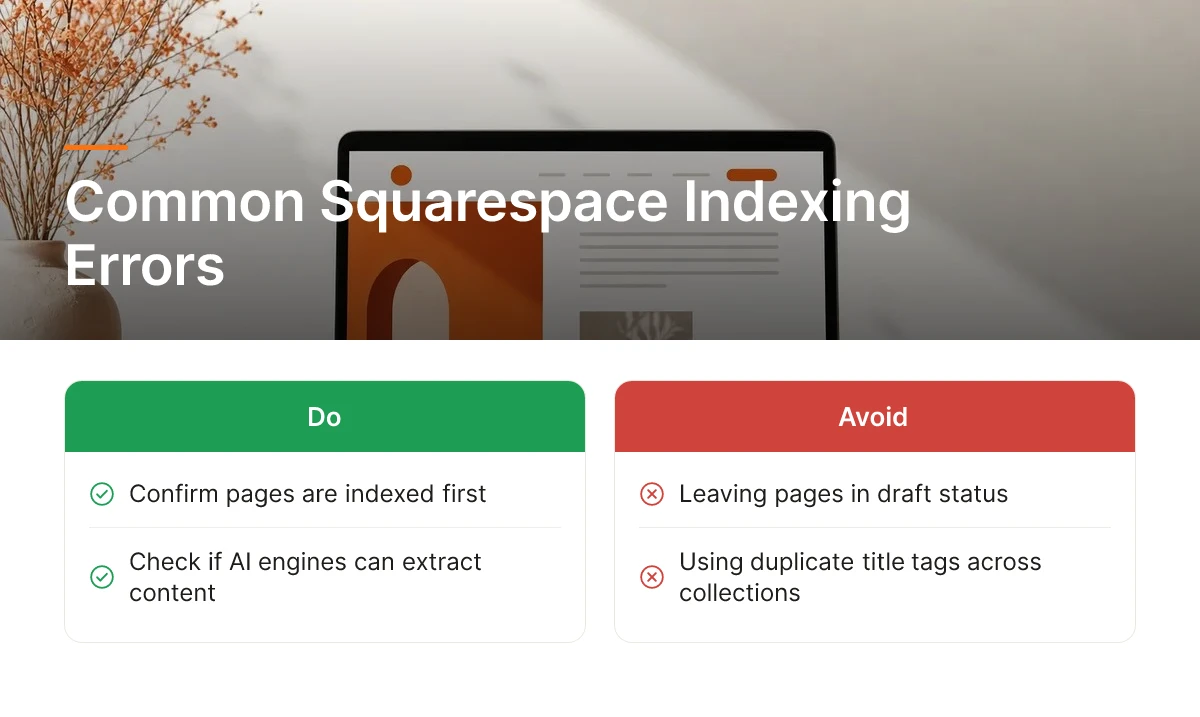
Start by confirming your pages are actually indexed, then check separately whether AI engines can read and extract them, indexed and extractable are not the same thing. Most indexing problems on Squarespace trace back to default settings the site owner never touched, not platform limitations.
What Are the Most Common Indexing and Crawl Errors on Squarespace Sites?
The errors below show up repeatedly on Squarespace builds and are worth checking first when seo for squarespace websites isn't delivering results:
- Pages left in draft or unlinked from navigation, which never get crawled at all
- Duplicate title tags, common when collection pages and individual items inherit the same template title
- Password-protected pages, often left over from client portfolio sites or members-only sections, that block crawlers outright
- Noindex tags applied automatically to system pages like search results or tag archives, sometimes bleeding into pages meant to be public
Each of these can quietly undercut an otherwise solid page [1]. Run a site: search on Google first. If a page you expect to see doesn't appear, that's your first signal. Then check Settings > Marketing > SEO inside Squarespace for any blanket noindex toggles left on from a previous redesign.
How Do You Diagnose Gaps with Google Search Console and AI Engines Directly?
Google Search Console shows you what's indexed, but it won't tell you whether ChatGPT or Perplexity actually cites the page. Treat the two checks as separate steps. In Search Console, use the URL Inspection tool to confirm a page is indexed and check the Coverage report for excluded pages and the reason given.
Then test manually: open ChatGPT or Perplexity and ask the exact question a customer would ask about your product or service. If a competitor shows up and you don't, the page may be indexed but still invisible to AI retrieval, often because the content isn't structured clearly enough to extract an answer from [1]. This dual-check approach is the most reliable practical method available right now for seo for squarespace websites, since no single dashboard covers both crawl status and AI citation status.
How Do You Force Squarespace to Re-Index Your Site After Major Updates?
After a redesign, URL change, or content overhaul, submit your updated sitemap in Search Console and request indexing on key URLs individually. Squarespace auto-generates a sitemap at yourdomain.com/sitemap.xml, and keeping it current matters because both Google and AI crawlers rely on it to discover new or changed pages without manually re-crawling the entire site [1]. Re-submitting it after structural changes shortens the gap between publishing and visibility.
Finally, confirm renderability: view the page with JavaScript disabled or use Search Console's "View Crawled Page" feature to see what a crawler actually receives. If key text only loads dynamically, some AI crawlers may miss it entirely.
Moonrank's technical audit layer checks these exact failure points, unindexed pages, duplicate titles, blocked crawlers, and renderability gaps, automatically, flagging what to fix before it costs you visibility in ChatGPT, Gemini, or Perplexity results.
What Third-Party Tools Can Fill Squarespace's SEO Gaps for AI Visibility?
Three categories of third-party tools close the gaps Squarespace leaves open: keyword and backlink research tools, AI-visibility trackers, and analytics connectors that plug into Squarespace without touching code. Most SMBs doing SEO for Squarespace websites need at least two of these working together, since no single native dashboard covers all three jobs.
Keyword and Backlink Research Tools
Squarespace's built-in SEO panel lets you edit titles, descriptions, and URL slugs, but it doesn't tell you what keywords competitors rank for or who links to them. Dedicated keyword and backlink research tools fill that gap by surfacing search volume, keyword difficulty, and the link profiles of competing sites, data you need to decide what to write about next and which gaps are worth targeting. These tools remain useful even as AI search grows, because the entities and topics they surface often double as the facts AI engines pull into generated answers.
What AI Search Visibility Tracking Tools Work With Squarespace, and How Do You Set Them Up?
AI search visibility tools monitor whether ChatGPT, Gemini, Claude, and Perplexity mention and cite your business, something Google Search Console was never built to show. Search Console reports clicks and impressions from Google's organic results; it has no visibility into what Perplexity cites in an answer or whether ChatGPT recommends your business by name. Squarespace itself acknowledges this blind spot, pointing site owners toward tracking how their business performs specifically within AI search results rather than relying on traditional search metrics alone [1].
Setting these tools up on Squarespace doesn't require editing theme code. Most verify ownership through a DNS TXT record or a meta tag added via Squarespace's built-in code injection field in site settings, and most connect to Google Analytics or Search Console through the same verification flow already documented in Squarespace's help center. Once connected, a visibility tracker can flag when your brand appears, or disappears, from an AI-generated answer in your category.
Where Moonrank Fits
Moonrank is built specifically to track and improve AI search visibility for Squarespace sites, monitoring brand mentions and citations across ChatGPT, Gemini, Claude, and Perplexity while publishing optimized content automatically every day. Instead of hiring an agency at a premium monthly retainer, Squarespace site owners can run Moonrank at a more budget-friendly cost and get the same outcome: daily content, schema markup, llms.txt configuration, and citation building handled on autopilot.
Squarespace's native tools handle on-page basics well, but they stop short of the structured data depth and continuous AI-engine monitoring that AI visibility requires. Pairing a steady content cadence with dedicated tracking is what actually moves the needle, a combination Squarespace alone doesn't offer out of the box.

Frequently Asked Questions
Is Squarespace good enough for SEO without any third-party tools?
Squarespace handles the basics well, clean code, fast hosting, and built-in schema for blog posts and products, but it has no native tools for AI search visibility. Its own help documentation focuses on allowing crawlers and writing clear content [1], not on structured citations or llms.txt configuration, which is where most ecommerce and B2B SaaS sites fall short today.
Does Squarespace support llms.txt or similar files for AI crawlers?
No, Squarespace doesn't offer a native way to create or host an llms.txt file through its dashboard. Site owners can work around this with custom code injection, but Squarespace's own guidance centers on crawler access and content clarity rather than this emerging file standard [1], so it requires manual setup outside the platform's standard settings.
Can you add custom schema markup to a Squarespace product or blog page?
Yes, but only through workarounds, since Squarespace generates some schema automatically and doesn't expose a built-in field for custom structured data on every page type. Business owners typically inject JSON-LD code manually into page settings for product or blog markup. This matters because structured data helps AI engines parse what a business actually sells or does, beyond generic schema Squarespace adds by default.
How often should you check if your Squarespace site shows up in ChatGPT or Perplexity results?
Check monthly at minimum, since AI search results shift as models retrain and competitors publish new content. Squarespace's own research with Peec AI analyzed 1.3 million citations across ChatGPT, Google AI Mode, and Perplexity [3], showing how fast citation patterns move, a pace manual spot-checks alone won't catch.
What's the fastest way to start improving seo for squarespace websites today?
Begin with a quick audit: confirm your pages are indexed, rewrite titles and headings as plain factual statements, add descriptive alt text to key images, and check for duplicate titles or accidental noindex tags. These fixes are free, require no code, and address the most common reasons Squarespace pages stay invisible to AI search engines.
Conclusion
Squarespace gives ecommerce and B2B SaaS sites a solid technical foundation, but it stops short of what AI search engines actually need: llms.txt files, deep schema markup, and ongoing citation building. Closing that gap means either hand-coding workarounds every month or automating the work entirely.
That's the gap Moonrank was built for, it runs daily content publishing, technical AI optimization, and cross-engine visibility tracking on autopilot for Squarespace sites, at a budget-friendly monthly cost instead of a premium agency retainer. Start by auditing whether ChatGPT or Perplexity already recommends your business, then visit moonrank.ai to see what's missing.
Sources & References
- Optimize your site for AI-powered search engines, Squarespace Help Center
- Is Your Squarespace Website Ready for AI Search? How to Improve Your Visibility in 2026
- AI Visibility: A Guide to AI Search for Business Owners, Squarespace
- Squarespace SEO Problems: How Bad is Squarespace for SEO? 2024 - Sara Does SEO
Recommended Articles
Explore more from our content library: