seo report free
Free SEO reporting tools can scan your site for technical issues, on-page gaps, and basic visibility signals — giving you a starting checklist without paying...
Understanding seo report free is essential. Free SEO reporting tools can scan your site for technical issues, on-page gaps, and basic visibility signals, giving you a starting checklist without paying an agency. Most free reports cover metadata, page speed, broken links, and keyword basics, but few measure how your business actually appears in AI search engines like ChatGPT or Perplexity, since that requires tracking citations and recommendations rather than traditional rankings. Use a free report as your diagnostic first step, then prioritize fixes that improve both Google visibility and AI search presence.
What a Free SEO Report Actually Checks
A free SEO report scans a fixed set of technical and on-page signals built around how Google's crawler reads a site, not how AI engines decide what to recommend.
Run any seo report free tool against your homepage and you'll get a checklist that looks nearly identical across providers. That's because most of them are auditing against the same 20-year-old ranking framework, just with a modern dashboard on top.
What Specific Metrics and Issues Do Free SEO Reports Analyze?
Expect coverage of metadata (title tags, meta descriptions, alt text), header structure (H1-H6 hierarchy), page speed, broken links, mobile-friendliness, and basic keyword presence on the page. Semrush's free checker, for example, scans meta tags, headings, keywords, backlinks, page speed, and mobile responsiveness, then returns a prioritized to-do list [2]. Rank Math's analyzer does something similar, it flags what's correct and what's missing, then hands you a downloadable PDF to act on or share with a developer [3]. Seobility's checker adds server configuration and external link factors to the mix, framing accessibility for "both traditional crawlers and AI bots" as the baseline requirement for visibility [5]. These are useful checks. A slow-loading product page or a missing title tag genuinely hurts an e-commerce store's Google rankings, and fixing them costs nothing.
How Do Free Tools Handle AI Search Visibility Versus Traditional Google SEO?
Most free tools were built to satisfy a crawler-based ranking model, and that model has almost nothing to do with how ChatGPT or Perplexity decide which business to mention. Google ranks pages by crawling links and weighing keyword relevance across billions of documents. AI engines work differently: they retrieve and cite specific sources, then synthesize an answer, which means your visibility depends on whether your business shows up as a citable, trustworthy entity, not whether your H2 tags are optimized. SEOptimer has started addressing this by flagging "LLM accessibility, identity, and citability" as separate factors from classic audit items [1], and SEO Site Checkup markets its product around the idea that a page can read well to a human and still get ignored by AI systems scanning for structured entity signals [4]. That's the mechanism gap: backlinks and keyword density earned you a ranking; citations and structured data earn you a mention.
A free report also only captures one moment in time. It tells you what's broken today, not whether ChatGPT is citing you next month, that requires ongoing tracking, which is where Moonrank's AI search visibility monitoring picks up where a one-time scan stops.
Free vs Paid: Where SEO Report Free Tools Hit Their Limits
A free SEO report is usually a one-time snapshot with a capped page count, no saved history, and a basic PDF export, enough for a quick checkup, not enough to track progress.
What Are the Real Limitations of Free Tiers?
Most free tools cap how much of your site they'll actually crawl. Seobility's free checker, for example, limits you to a set number of checks per day before asking you to sign up for a paid plan just to keep scanning [5]. Semrush's free SEO Checker runs a single audit and hands you a prioritized list of what to fix, but it doesn't keep monitoring your site after that first scan [2].
Rank Math's free SEO Analyzer follows the same pattern, you get one report, downloadable as a PDF, and if you want deeper or recurring analysis, the plugin's paid suite is the next step [3]. None of this makes free tools useless. It just means they're built for a single checkup, not for a business that needs to know if last month's changes actually moved the needle.
How Do Export Formats and Integrations Differ Between Free and Paid Tools?
Free tiers typically hand you a plain PDF and call it done. Paid tiers add CSV exports for spreadsheet analysis, API access for pulling data into your own dashboards, and CMS plugin integration that ties reporting directly into WordPress or Shopify. SEOptimer positions its paid tier around white-label, branded PDF reports for agencies reselling audits, a feature category that doesn't exist on the free side at all [1].
That gap matters more than it looks. A CSV export lets you compare this month's crawl data against last month's in a spreadsheet. A one-off PDF just sits in a downloads folder.
The deeper problem with any seo report free tool is history. Without stored data across multiple crawls, you can't tell whether your site's technical score improved, declined, or stayed flat, you're comparing today's report to nothing. Seobility's own tiered structure makes this explicit: free users get a handful of checks per day, while paid tiers enable the volume needed for ongoing checks [5]. SEO Site Checkup frames the same shift in terms of AI visibility specifically, arguing that static one-time audits miss how a site performs across AI engines over time [4].
The practical tradeoff is simple. A free SEO report free tool works fine if you want a single gut check on a new site or a client pitch. If you need to know whether your business is gaining or losing ground, especially in front of ChatGPT, Gemini, Claude, or Perplexity, ongoing monitoring is the only way to see it, which is exactly the gap automated tracking tools like Moonrank are built to close.

Choosing the Right Free SEO Reporting Tool for Your Site
The best free SEO reporting tool is the one that matches your site type, your scan volume, and your comfort with how much data you're willing to hand over.
Not every free scanner treats WordPress sites, local businesses, and 500-page e-commerce catalogs the same way. Some are built around plugin ecosystems, others focus on generic HTML audits, and a few now layer in AI-visibility checks alongside traditional SEO signals [4]. Matching the tool to the site, instead of grabbing whichever one ranks first on Google, determines whether the resulting seo report free download is a genuinely useful punch list or a generic scorecard you'll ignore after the first read.
What's the Best Free Tool for WordPress, Local SEO, or Larger Sites?
Match the tool to your platform first, because CMS compatibility determines whether recommendations are fixable or just theoretical. If you run WordPress, look for a report that maps issues directly to plugin-level fixes, meta tag gaps, missing schema, or slow-loading themes, rather than one that flags problems with no clear path back to your dashboard [3]. A report that just says "improve page speed" without pointing to the plugin or setting causing it leaves you no better off than before you ran the scan.
If you're a local business, a restaurant, boutique hotel, or service provider, check whether the report covers local listing signals: NAP consistency, Google Business Profile completeness, and location-based visibility. Many general-purpose SEO checkers skip this entirely and focus only on on-page factors [2], which misses the exact signals that determine whether you show up in "near me" searches or AI-generated local recommendations.
Larger or multi-page sites face a different problem: free scan limits. Several tools cap free audits at a handful of pages or a single crawl depth [3][5], which means an e-commerce store with thousands of SKUs gets a report covering a fraction of its actual footprint. Before relying on the results, confirm the free tier's scan limit actually covers a meaningful slice of your site, otherwise you're optimizing based on incomplete data.
How Do Data Privacy Practices Differ Across Free SEO Reporting Tools?
Privacy terms vary more than most site owners expect. Before entering a URL, check three things: how long the tool retains your site data, whether that data gets shared with or sold to third parties, and whether your scan results are public or private by default. Some tools index submitted URLs publicly to build their own databases, which means a competitor could find your audit results with a simple search.
Free reports work well as a first pass, a way to catch obvious technical gaps before committing budget to anything recurring. But a one-time scan won't track whether ChatGPT, Gemini, or Perplexity start recommending you next month. That's a different, ongoing job, one Moonrank was built for, running daily content and technical fixes on autopilot at $99/month, well below what agencies charge for the same visibility work.
Turning a Free SEO Report Into Real Improvements
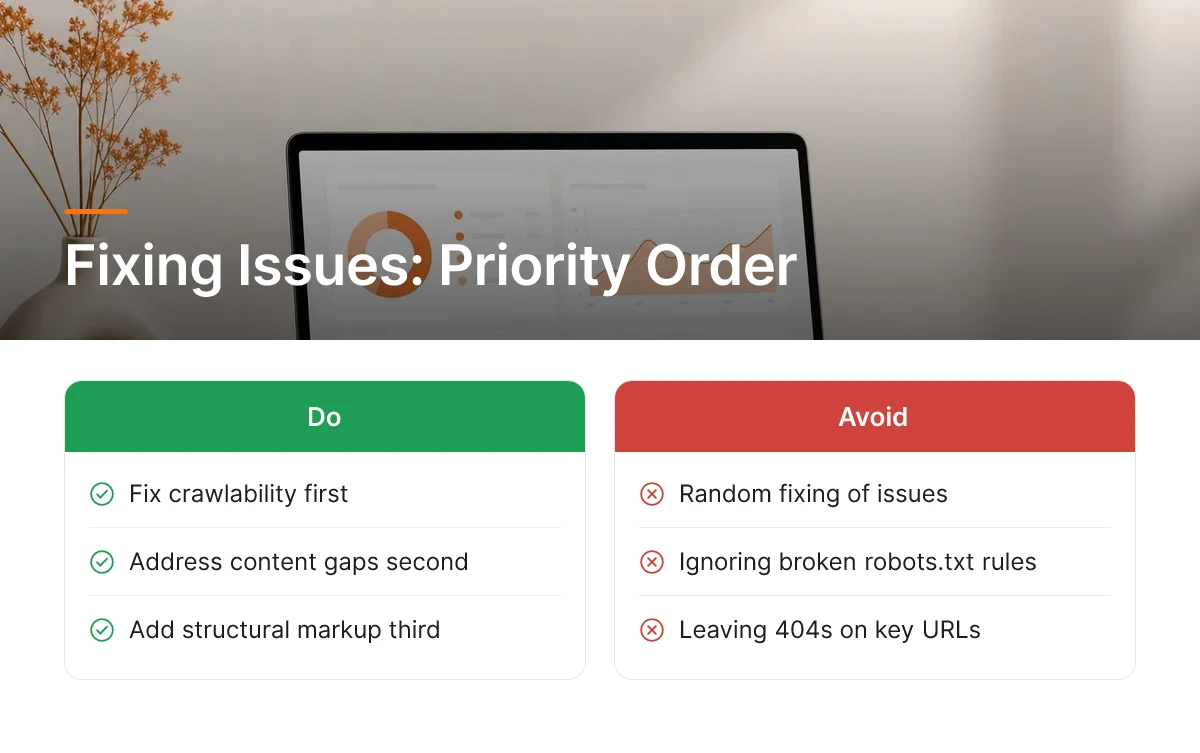
A free SEO report only pays off if you fix issues in the right order: crawlability first, content gaps second, structural markup third. Random fixing wastes the report's value.
Start with anything blocking search engines and AI crawlers from reaching your pages, broken robots.txt rules, missing sitemaps, 404s on important URLs, or slow server response times. Semrush's Site Audit tool groups these under "critical issues" for exactly this reason: nothing else matters if a bot can't reach the page [2]. Once crawlability is clean, move to on-page content gaps, thin pages, missing meta descriptions, duplicate titles, and keyword mismatches between what you sell and what your pages actually say. Only after those two layers are solid should you touch schema markup, internal linking structure, and other technical polish. SEOptimer's audit approach reflects this same logic, flagging LLM accessibility and citability issues alongside traditional on-page factors [1].
What's a Realistic Timeline for Seeing SEO Improvements?
Technical fixes tend to show measurable movement within a few weeks; content and authority changes usually take longer.
Fixing a broken sitemap or unblocking a crawled-but-blocked page can get pages re-indexed within days. But ranking improvements from new content, better keyword targeting, or earned citations build more slowly, search engines and AI models both need repeated signals before they trust a change is permanent. If you run an SEO report free of charge expecting an overnight jump in rankings, you'll be disappointed. Set expectations by issue type, not by a single deadline.
How Do You Benchmark Progress Across Multiple Free Reports Over Time?
Most free tools don't store report history, so you have to build your own benchmark by saving each report and comparing manually.
Export or screenshot your score, issue count, and key metrics every time you run a check, monthly for active sites, quarterly if you're making slower changes. Seobility's free checker, for example, limits daily queries and doesn't retain past results for free accounts [5], so a spreadsheet tracking date, score, and fixed issues becomes your real record. Rank Math's analyzer works the same way, generating a snapshot report rather than a trend line [3]. Consistent, scheduled re-checks matter more than any single report, that's what turns a one-time free seo report free into an actual improvement record you can show a partner, investor, or your future self.
Can a Free SEO Report Improve Your AI Search Visibility?
A free SEO report can fix the basics that hold a site back, but on its own it will not make ChatGPT or Perplexity recommend your business. The improvement comes from what you do with the findings, not the report itself.
Do Free SEO Tools Measure AI Search Visibility or Just Google?
Most tools that generate an seo report free of charge are still built around traditional Google-style signals, meta tags, page speed, backlinks, and keyword density. Semrush's free SEO Checker, for example, scans meta tags, headings, keywords, backlinks, and mobile usability [2], and Rank Math's SEO Analyzer focuses on identifying on-page issues and generating a downloadable audit [3]. Seobility's checker similarly reports on meta information, page quality, and link structure [5]. These are useful diagnostics, but none of them tell you whether an AI engine has cited your business in an answer or is even aware your business exists as a distinct entity.
A newer wave of tools has started layering AI visibility checks on top of the traditional audit, SEOptimer now reports on LLM accessibility and citability alongside standard SEO factors [1], and SEO Site Checkup markets itself around an "LLM Visibility Checker" for AI-engine readiness [4]. That shift matters, because it signals the industry recognizes traditional audits and AI visibility are not the same measurement.
What SEO Changes Actually Move the Needle for AI Search Recommendations?
AI engines pull from structured data, clear entity information, and facts that stay consistent across the web, your business name, address, category, and offerings need to match everywhere they appear, from your website to directories to review sites. Content written to directly answer specific questions, rather than to rank for keyword phrases, tends to get pulled into AI-generated answers more often. Schema markup and an llms.txt file give AI crawlers a structured way to parse and trust what your site says about your business, rather than guessing from unstructured text.
A one-time free audit catches basics like broken schema or missing meta descriptions, but AI engines refresh their sourced answers continuously, so a single snapshot goes stale fast. Once a free report has flagged the foundational gaps, the practical next step is ongoing, automated optimization rather than another one-off scan. Moonrank runs that process daily, publishing content, maintaining schema and llms.txt, and tracking how your business shows up across ChatGPT, Gemini, Claude, and Perplexity, so visibility keeps improving after the first report closes. Visit www.moonrank.ai to see where your business currently stands.

Frequently Asked Questions
Are free SEO reports accurate enough to trust for business decisions?
Free SEO reports are accurate for spotting technical issues like broken tags or missing meta descriptions, but treat the scores as directional, not definitive. Tools like Semrush's checker and Seobility's checker [2][5] use their own scoring models, so two free tools can rate the same site differently. Use them to find problems, then verify priority before investing time or budget.
How often should you run a free SEO report on your website?
Run a free SEO report monthly, or after any major site change like a redesign or new product launch. Daily checks add little value since most fixes take weeks to affect rankings, but many free tools cap you at a handful of checks per day anyway [5].
Can a free SEO report replace hiring an SEO agency?
A free SEO report can replace an agency's initial audit, but not the ongoing content, technical fixes, and monitoring an agency provides. Free tools flag issues and hand you a checklist; someone still has to write content, fix schema markup, and track results every week. That ongoing work is what most SMBs actually lack time for, not the diagnosis.
Do free SEO tools show if ChatGPT or Perplexity mention your business?
Most free SEO tools do not show AI mention tracking in real depth, a few, like SEOptimer and SEO Site Checkup, have added basic AI visibility or LLM readiness checks [1][4]. These typically flag whether your content is structured for AI crawlers rather than confirming actual citations inside ChatGPT or Perplexity answers, which requires dedicated visibility tracking.
Conclusion
Free SEO reports are a starting point, not a strategy. They flag technical problems and give you a baseline score, but they won't publish content, fix your schema markup, or tell you whether ChatGPT and Perplexity actually recommend your business over a competitor's.
If your free audit turned up gaps in structured data or thin content, the next step is deciding who does that fix work, you, an agency, or an automated system. Moonrank runs that work daily for $99/month, from technical AI optimization to AI search visibility tracking across ChatGPT, Gemini, Claude, and Perplexity. Start with a free report at moonrank.ai, then compare what it costs to fix everything yourself against letting Moonrank handle it on autopilot.
Sources & References
- Analyze Websites With Free SEO Audit & Reporting Tool - SEOptimer
- Free SEO Checker: Check for SEO & AI Search Issues
- SEO Analyzer - Generate a Free SEO Report of Your Website
- Reclaim Lost Traffic with LLM-Ready SEO Intelligence | SEO Site Checkup
- SEO Checker | Test your website for free with Seobility
Recommended Articles
Explore more from our content library: